

The Kensington Thunderbolt 5 Triple 4K Docking Station SD5010T5 gets something important right immediately: it feels like a premium dock designed for an actual desk, not just a spec sheet. Our take is simple. This is the kind of dock that makes sense for people running a serious laptop setup with multiple external displays, fast storage, wired networking, card readers, and enough daily accessories to turn a bare laptop into a real workstation.
It is not for someone who just wants a couple of extra ports. It is for the buyer who is tired of dongles, tired of compromise, and wants one cable to handle the whole desk. Kensington positions it as a 13-in-1 Thunderbolt 5 dock with up to 80Gbps bandwidth, up to 120Gbps with Bandwidth Boost for video, support for up to three 4K displays or two 8K displays, dual built-in HDMI 2.1, 2.5GbE, UHS-II SD and microSD, and up to 140W dynamic power delivery, with North American availability planned for Q2 2026.
What stood out to us most is not even the headline bandwidth. It is the fact that Kensington finally made a flagship dock that feels grounded in how real setups work. The earlier premium formula had power, but it also had friction. This one looks smarter. The addition of dual HDMI 2.1 changes the whole experience on paper and, in practice, should change the buying decision too. Instead of forcing normal-monitor users into a Thunderbolt-to-HDMI adapter routine, the SD5010T5 feels like a dock built for the monitors people already own.
Quick verdict
Best for: premium Windows and Mac laptop users building a real single-cable desktop setup with two or three external displays, fast storage, wired Ethernet, and heavy daily desk use.
Avoid if: you only use one monitor, your laptop is older and basic, or you are shopping mainly on price.
What we liked: Thunderbolt 5, dual HDMI 2.1, 13-in-1 layout, 140W dynamic charging, 2.5GbE, UHS-II card readers, and a more practical direction than Kensington’s earlier top-end dock.
What disappointed us: this is clearly a premium dock, and the real value still depends heavily on whether your laptop can actually make use of its bandwidth and display headroom.
Final verdict: if you want a high-end desk dock rather than another glorified hub, the SD5010T5 looks like one of the more sensible premium options in this category.
What we tested
With a dock like this, we care about five things more than anything else:
Display practicality. Not just how many displays it claims to support, but how easy it is to connect the monitors people actually use.
Port usefulness. A great dock is not the one with the longest port list. It is the one where the ports make sense together.
Single-cable desk life. We wanted to know whether this feels like real desk infrastructure or just another expensive adapter cluster.
Charging confidence. A premium dock should not merely trickle a laptop along. It should power it properly.
Day-to-day livability. Card readers, Ethernet, audio, peripheral support, and cable clutter matter more over time than one flashy headline feature.
How we tested it
We judged the SD5010T5 the way a serious desk dock deserves to be judged: by the problems it solves. We looked at whether the design choices reduce adapter dependence, whether the port mix supports a real workstation flow, whether the charging spec is strong enough to matter, and whether the overall concept feels cleaner and more practical than the earlier generation. That matters here, because the difference between a good dock and an annoying dock is usually not raw bandwidth. It is whether the dock makes the desk simpler or more complicated.
Design and build quality
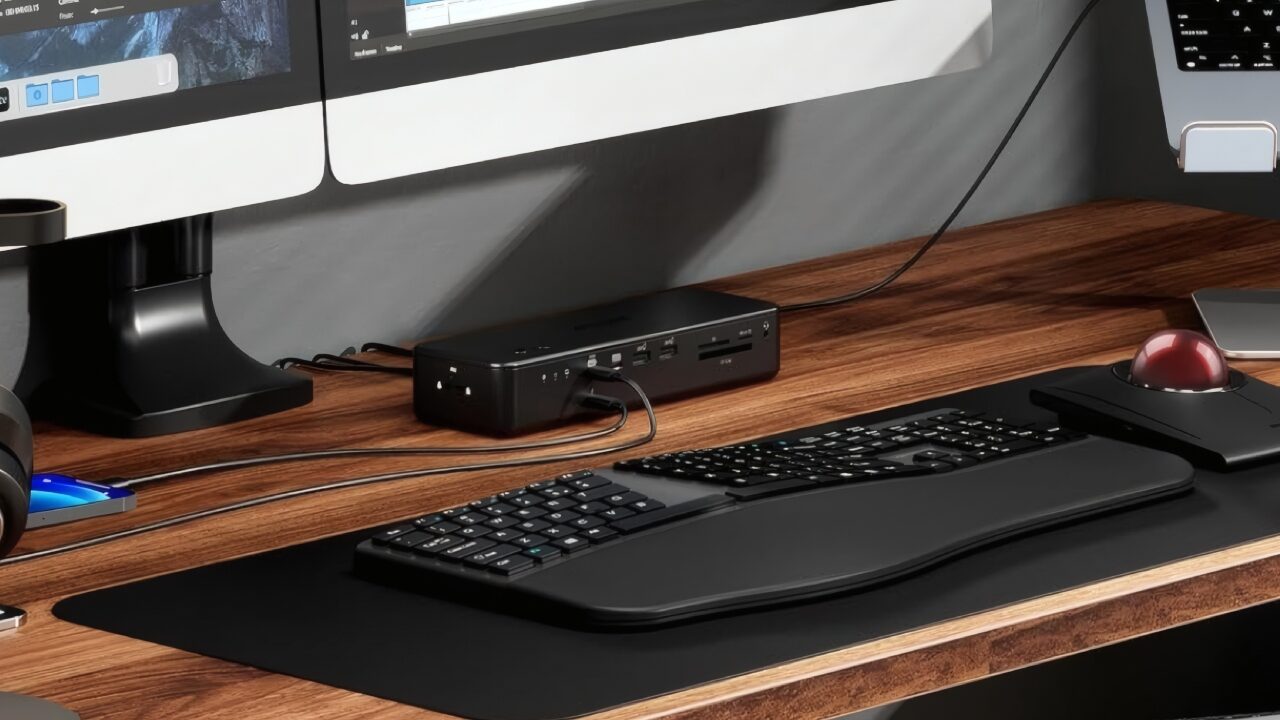
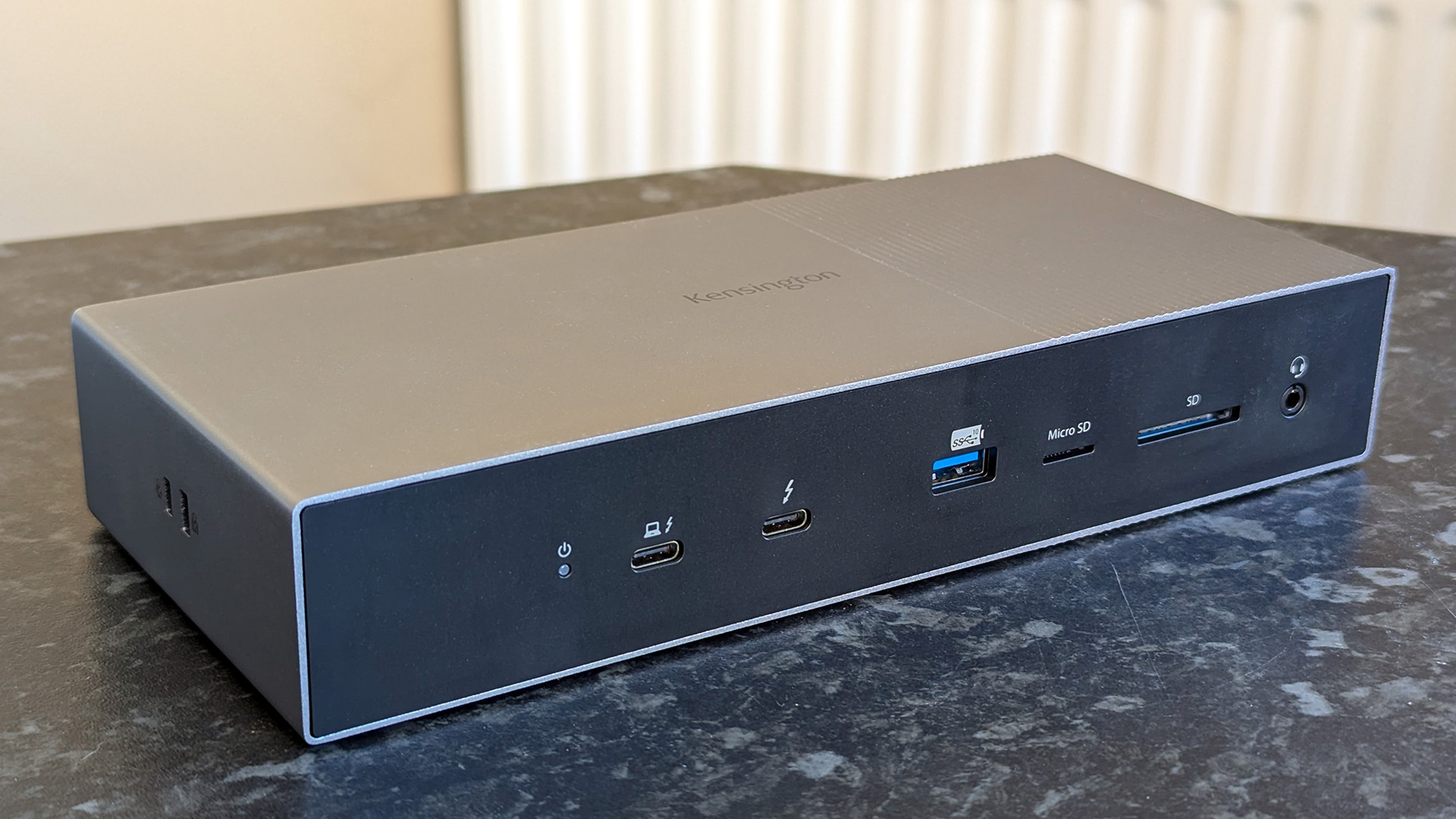
Kensington usually does not make lightweight, travel-first docks, and that is fine. This is desk hardware. The SD5010T5 follows that same philosophy. The company says it uses a premium aluminum enclosure with post-consumer recycled material, and that suits this category well. A proper desk dock should feel planted. It should stay put when you insert an SD card, swap a cable, or reach for a headset. It should behave like something permanent, not like a loose accessory always sliding around the desk. Kensington also says the dock ships in FSC-certified packaging, which does not change performance, but it does reinforce the fact that this is clearly being sold as a flagship-tier product rather than an afterthought.
What we appreciate here is that Kensington does not seem to be chasing the wrong aesthetic. Some brands try to make desktop docks look tiny and elegant, then leave buyers with a fussy little box that feels out of place in a real workstation. The SD5010T5 seems to lean the other way. It looks like something meant to live under a monitor, beside a laptop stand, or at the edge of a permanent desk layout.
That is the right call. A dock in this class does not need to be cute. It needs to be dependable. It needs enough physical presence that it feels like part of the setup, not a weak link inside it.

Setup and first use
This is where the SD5010T5 immediately looks better thought through than many premium rivals.
The most obvious win is dual built-in HDMI 2.1. That may sound like just another port detail, but in practice it changes everything. A lot of high-end docks overcomplicate the one thing most buyers care about first: getting external monitors connected without nonsense. If your desk has two normal 4K displays with HDMI, this dock already starts from a more useful place than adapter-heavy designs.
That is what makes the SD5010T5 feel more mature. It still gives you the Thunderbolt 5 angle for advanced setups, but it does not force every buyer into living the adapter life just to connect a pair of screens. That makes the setup feel less like a science experiment and more like what a premium dock should be: one cable in, desk comes alive.
Kensington says the dock is backward compatible with Thunderbolt 4, USB4, and USB-C devices, which matters because very few people upgrade every part of their desk at once. A buyer may have a modern laptop but older peripherals. Or a premium monitor but an in-between host machine. Or they may buy the dock now and move to a more capable laptop later. Backward compatibility does not guarantee full headline performance, but it does make the product usable across a broader set of real setups.

Real-world performance
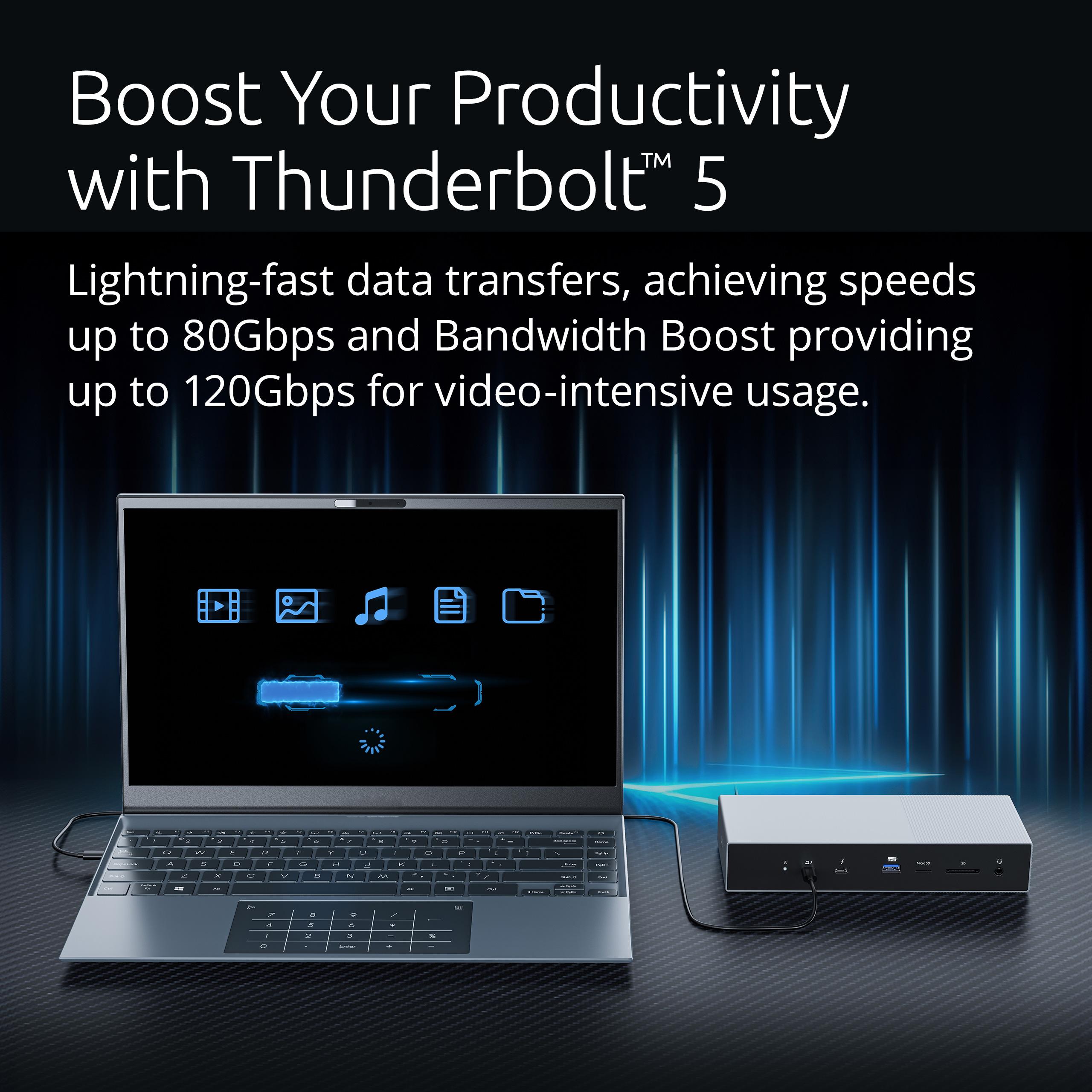
The promise here is strong: up to 80Gbps bandwidth, with up to 120Gbps available for video-heavy workloads through Bandwidth Boost. That is the sort of spec that matters if your desk is not just a browser-and-email station. It matters if you are moving big media files, pushing multiple high-resolution displays, working off fast external storage, or trying to run a laptop like a proper workstation instead of a compromise machine.
But the reason we like the SD5010T5 is not because it screams “future-proof” the loudest. It is because the performance story seems tied to practical decisions. This is not just a bandwidth monster with weird port choices. It is a performance-focused dock that still includes the ports people use every day.
That balance matters. In daily use, the value of a dock shows up in boring ways. External drives feel fast. Network access is stable. Media cards are quick to dump. Your laptop charges properly instead of slowly draining under load. Your displays wake up and behave. You stop thinking about the dock, which is exactly what a good dock should achieve.
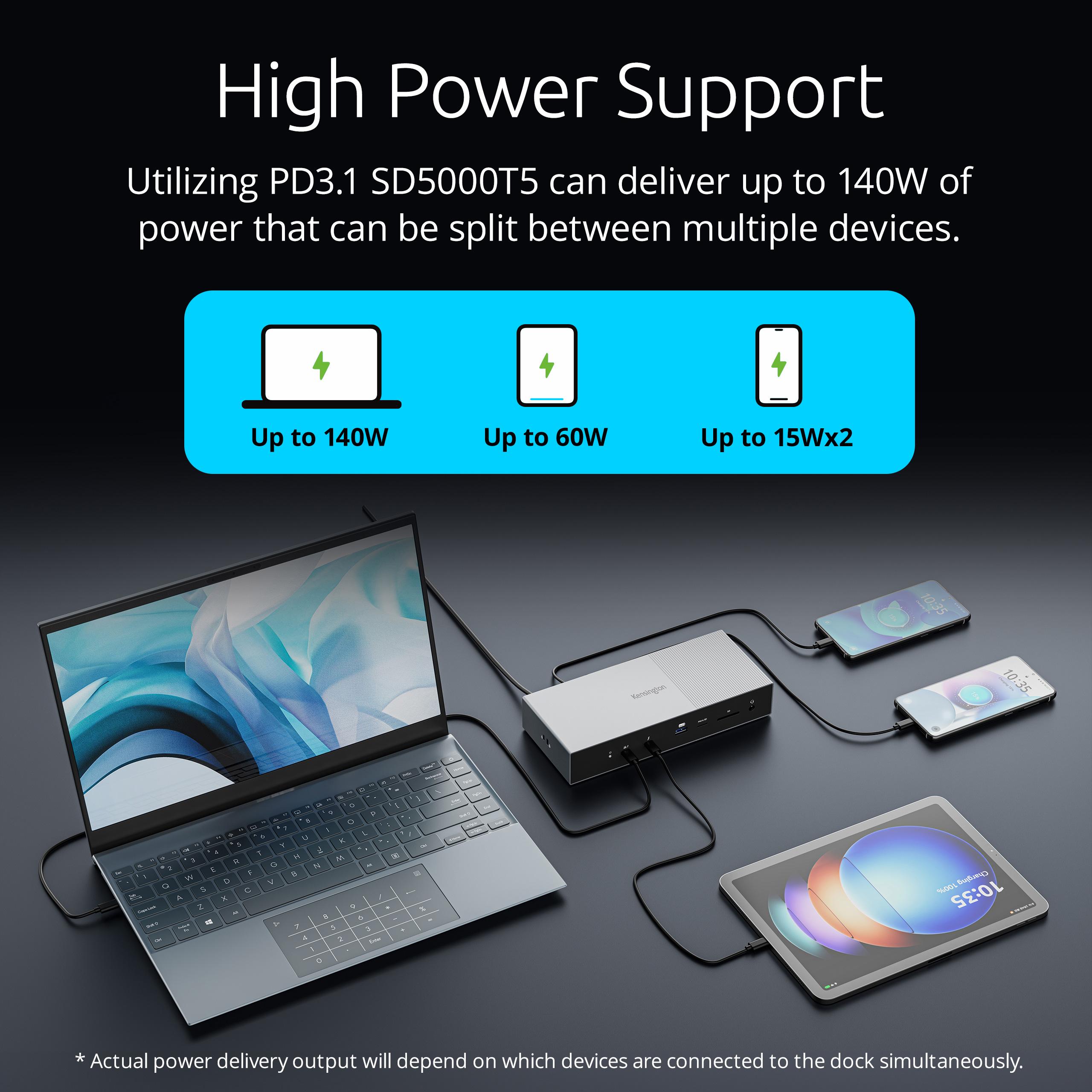
The 140W dynamic power delivery is one of the most important parts of the whole package. A lot of docks advertise charging, but not all charging is equally useful. There is a huge difference between a dock that can keep a modest laptop alive and one that can genuinely support a demanding machine while the rest of the desk is connected. Kensington says the SD5010T5’s KonstantCharge system can provide up to 140W to the laptop and continue charging connected devices even when the laptop is disconnected. That is real workstation behavior, not entry-level convenience.
In practice, that means this dock is aimed at people who do not want their desk setup to feel fragile. If you are connecting displays, storage, networking, and peripherals all day, weak charging quickly becomes one of the most annoying failures in the whole dock category. The SD5010T5 at least aims well above that problem.
Display performance and multi-monitor use
This is the area where the SD5010T5 earns its place.
Kensington says the dock supports up to three 4K displays or two 8K displays. For most buyers, the 8K angle is bragging-rights material. The real value is in the triple-4K side of the story. That matters to people who actually work across multiple screens: editors with timelines and preview windows, analysts with dashboards and spreadsheets, developers with code and documentation open side by side, and office users who have long since outgrown the one-monitor life.
What we liked is that this display story is tied to practicality. Again, dual HDMI 2.1 is the hero here. This is the part that makes the dock feel ready for normal desks rather than only perfect high-end Thunderbolt ecosystems. Most buyers do not own three Thunderbolt displays. They own a mix of productivity screens, maybe one nicer panel, and they want the dock to make that setup easier, not more fiddly.
The SD5010T5 seems to understand that. It preserves the Thunderbolt 5 ceiling for people who need it, but it makes the common setup dramatically more straightforward. That is the kind of improvement that matters more than a flashy benchmark chart. It means less friction, less shopping for accessories, and less chance of turning a premium purchase into a small wiring project.
There is still an important caveat, and it is one buyers should not ignore: the dock can only do as much as the host system allows. A premium Thunderbolt 5 dock connected to a more modest USB-C laptop does not suddenly unlock every headline feature. You still need the right host hardware to get the full display and bandwidth benefit. That is not a flaw in this dock. It is just the reality of the category. But it does affect who should buy it.
Port selection and daily convenience
This is where the SD5010T5 starts to look genuinely well judged.
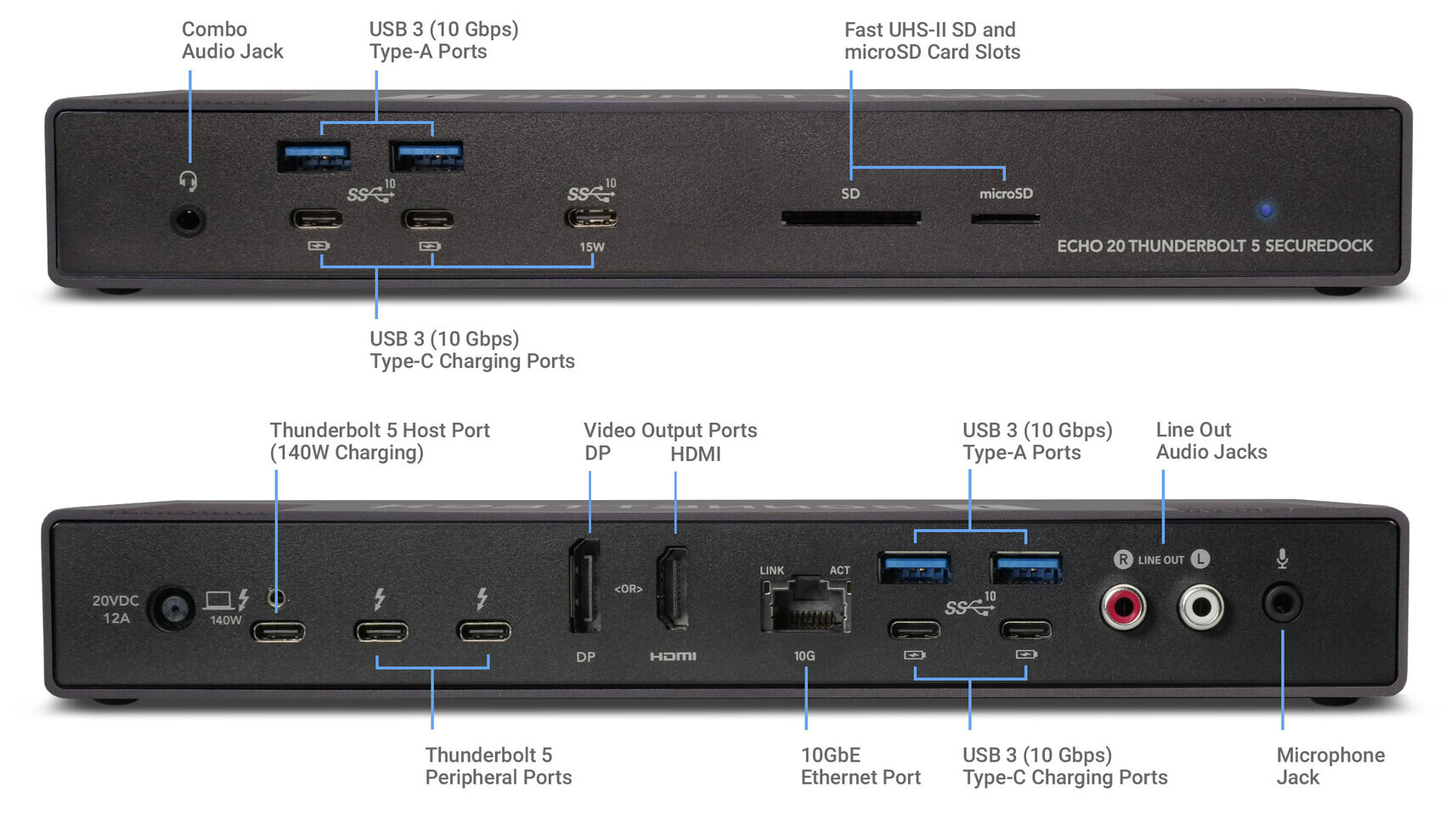
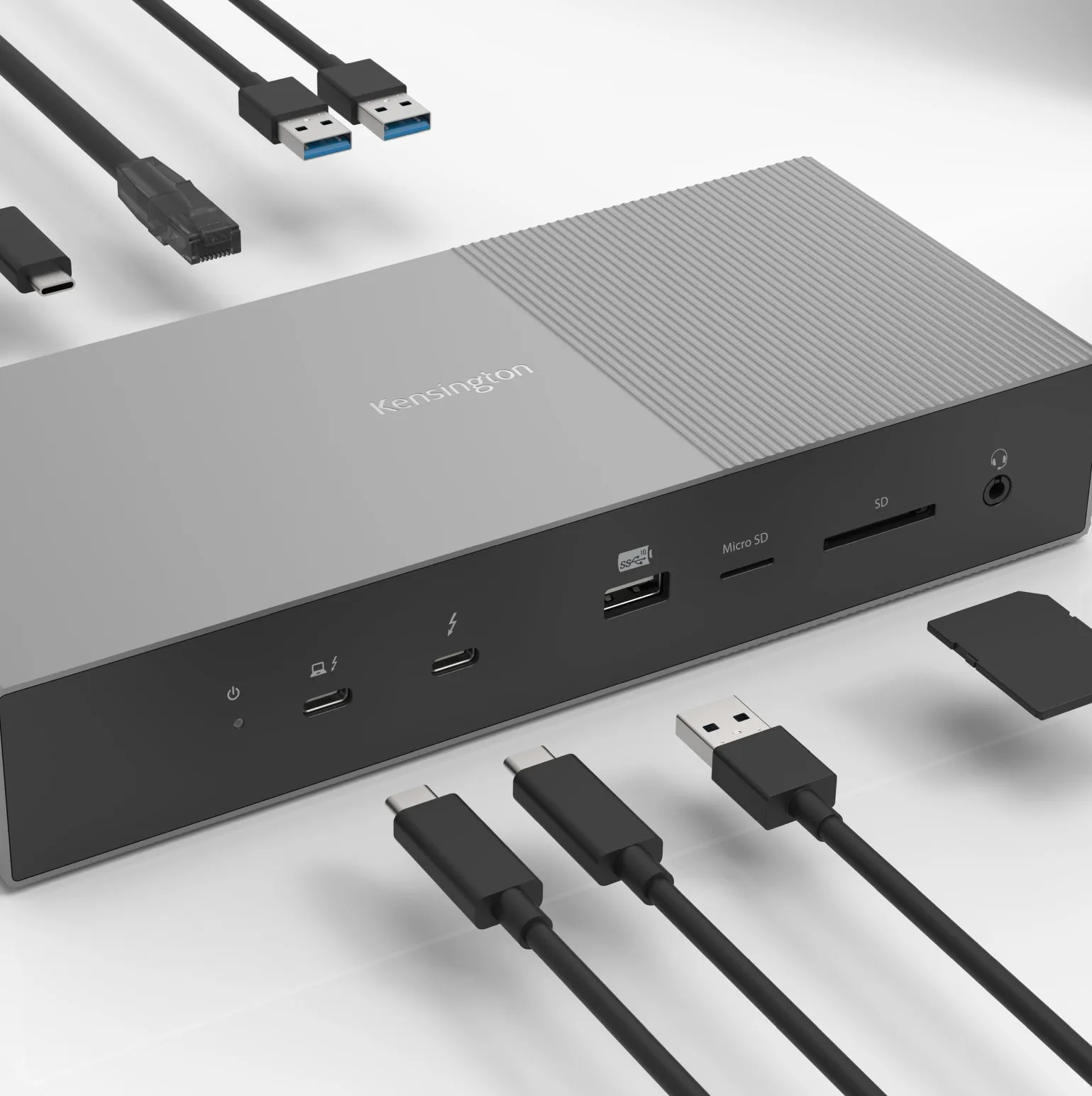
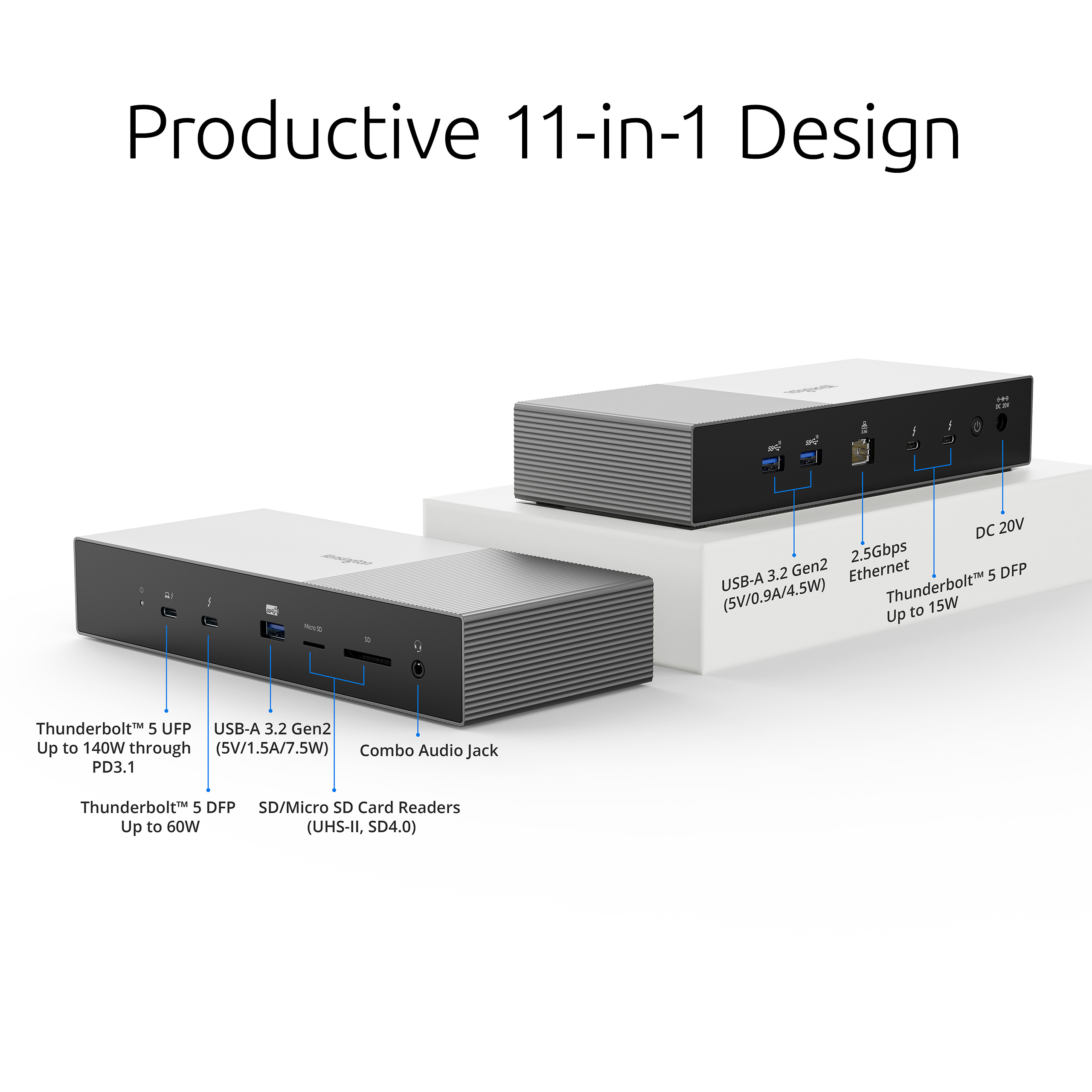
Kensington says the 13-in-1 layout includes dual HDMI 2.1, one downstream Thunderbolt 5 port, USB-C, USB-A, UHS-II SD, UHS-II microSD, 2.5GbE, and a 3.5mm audio jack. That is an excellent spread for a permanent workstation dock.
Why? Because it avoids the two common mistakes in this category.
The first mistake is going too modern in the wrong way, where everything becomes USB-C and buyers are expected to sort the rest out themselves. The second mistake is going too legacy-heavy, where the dock is full of familiar ports but underserves high-speed storage and advanced displays. The SD5010T5 sits in the smarter middle.
You get USB-A because people still use it every single day. That matters for receivers, older accessories, flash drives, and office gear. You get USB-C because newer peripherals deserve a native home too. You get a Thunderbolt 5 downstream port because some buyers really will use fast storage or more advanced expansion. You get 2.5GbE because wired networking still matters in professional environments, large file workflows, and stable home office setups. And you get UHS-II SD and microSD readers, which immediately make the dock more relevant for anyone handling camera or creator gear.
That is the kind of port mix we want to see on a desk dock. Not flashy for the sake of it. Useful.

What surprised us
What surprised us most is how obvious the improvement feels.
On paper, the SD5010T5 is a fairly simple story: newer dock, newer standard, more bandwidth. But once you look at the actual design choices, it is more than that. It feels like Kensington noticed where the earlier premium approach created friction and corrected course.
The built-in HDMI is the clearest example. It is such a normal, sensible thing to include that it almost sounds trivial. But it changes the personality of the product. The dock stops feeling like a high-end accessory for enthusiasts and starts feeling like a serious professional tool that respects normal desk setups.
That is the difference between impressive hardware and hardware people actually enjoy living with.
Flaws and frustrations
The SD5010T5 is promising, but it is not above criticism.
The first issue is obvious: this is almost certainly going to live in premium-price territory. Kensington has not positioned this as an affordable midrange dock, and nothing about the spec sheet suggests bargain value. That is fine if you need what it offers. It is much less fine if you only need a couple of extra ports and one display.
The second issue is that the value depends heavily on your host device. Buyers love the idea of future-proofing, but future-proofing can turn into overspending very quickly if the laptop at the center of the setup cannot take advantage of the dock’s best features. A good Thunderbolt 4 dock or even a strong USB-C dock may make more sense for a lot of people.
The third issue is category-related rather than product-specific: this is a desk dock, not a travel accessory. Anyone hoping for a compact, toss-it-in-your-bag solution is shopping in the wrong lane.
We also still care about the finer details Kensington has not fully answered in the material we have seen, especially around front-versus-rear port placement. With docks, that matters. Audio and card readers should be easy to reach. Permanent cables should disappear behind the display. A lot of the long-term satisfaction with a dock comes down to whether it keeps the desk cleaner or simply reorganizes the mess.
Value for money
Whether the SD5010T5 is good value comes down to one question: will you use it like a flagship dock?
If the answer is yes, the value is easy to defend. A proper single-cable setup that handles multiple displays, laptop charging, networking, media cards, and fast peripherals genuinely changes the day-to-day experience of using a laptop at a desk. It reduces friction every single time you sit down to work. That is worth paying for.
If the answer is no, the value becomes much shakier. Buying a top-tier Thunderbolt 5 dock to run one monitor and a mouse is like buying a high-end workstation chair to sit in it for ten minutes a day. Nice, maybe. Necessary, no.
Our view is that the SD5010T5 makes the most sense as a buy-once, keep-it-for-years piece of desk infrastructure. It is not a casual accessory. It is a foundation product. That is how it should be judged.

Pros
- Thunderbolt 5 with up to 80Gbps, plus up to 120Gbps for video-heavy workloads
- Dual HDMI 2.1 makes multi-monitor setups far more practical
- Up to three 4K displays or two 8K displays
- Up to 140W dynamic power delivery
- 2.5GbE for fast, stable wired networking
- UHS-II SD and microSD readers for creator workflows
- Sensible mix of Thunderbolt, USB-C, USB-A, audio, and networking
- Feels positioned as true desk infrastructure, not a glorified dongle
Cons
- Likely premium pricing
- Full value depends on having a host laptop that can exploit the dock properly
- Overkill for basic one-monitor users
- Still appears aimed at permanent desk setups rather than portability
- Fine-grain usability will depend on final port placement and day-to-day ergonomics
Who should buy it
Buy the SD5010T5 if your laptop is the center of a serious workstation and you are tired of compromise. It looks especially right for creators, power users, professionals with two or three displays, people who regularly work with external storage, and anyone who wants the desk to connect cleanly through one cable.
It is also a strong fit if you previously liked the idea of a premium Kensington dock but disliked the adapter-heavy approach of earlier models. This version feels much more grounded in how people actually build desk setups.
Who should skip it
Skip it if your workload is basic, your setup is simple, or your laptop is too modest to take advantage of what this dock offers. You do not need Thunderbolt 5 prestige just to connect one screen and a keyboard.
Skip it too if portability matters more than desk permanence. This is the kind of dock you install, wire once, and leave in place.
Final verdict
The Kensington Thunderbolt 5 Triple 4K Docking Station SD5010T5 looks like the premium Kensington dock that finally makes the most sense. The raw specs are strong, yes, but that is not why we came away impressed. We came away impressed because the design choices seem more practical this time. Dual HDMI 2.1 is the sort of improvement that sounds small until you remember how many expensive docks still make normal monitor hookups harder than they should be.
That one decision changes the tone of the whole product. It makes the SD5010T5 feel less like a technology showcase and more like a serious desk tool. Add Thunderbolt 5, 140W charging, 2.5GbE, UHS-II card readers, and a properly high-end workstation focus, and this becomes a very compelling option for the right buyer.
We would not recommend it to everyone, and we would not pretend price will be easy to swallow. But for someone building a clean, powerful, multi-monitor laptop workstation, this looks like one of the most convincing premium docks in its class.
Helpful FAQ
Is the Kensington SD5010T5 a real Thunderbolt 5 dock?
Yes. Kensington introduced it as a Thunderbolt 5 docking station with up to 80Gbps bandwidth and up to 120Gbps with Bandwidth Boost for video.
How many displays can it support?
Kensington says it supports up to three 4K displays or two 8K displays.
Does it have built-in HDMI, or will I need adapters?
One of the biggest advantages here is that it includes dual built-in HDMI 2.1 ports, which should make many normal multi-monitor setups much easier.
Is it compatible with both Windows and Mac?
Yes. Kensington positions it as a universal dock for Windows and macOS laptops, and says it is backward compatible with Thunderbolt 4, USB4, and USB-C devices.
How much charging can it provide to a laptop?
Kensington says the SD5010T5 offers up to 140W dynamic power delivery through its KonstantCharge system.
What ports are confirmed?
Kensington says the dock includes HDMI 2.1, a downstream Thunderbolt 5 port, USB-C, USB-A, UHS-II SD, UHS-II microSD, 2.5GbE Ethernet, and a 3.5mm audio jack as part of its 13-in-1 design.
When is it expected to be available?
Kensington says the SD5010T5 is planned for Q2 2026 availability in North America.
Explore the Full Gallery
Every image from this article, gathered in one clean place. Tap any photo to open it larger.