
The Belkin Connect 8-Port Dual Display USB-C Hub does not exist in a vacuum. Most buyers looking at it are not asking, “Is this a good USB-C hub?” They are asking a more practical question:
“Should I buy this Belkin hub, or should I just get an Anker 8-in-1 dual-display USB-C hub and save the difference?”
That is the real comparison.
Not Belkin versus every dock on the market. Not Belkin versus a full Thunderbolt workstation dock. Not Belkin versus the cheapest anonymous adapter with two HDMI ports and suspiciously optimistic product photos.
The more honest alternative is something like the Anker 553 USB-C Hub / Anker-style 8-in-1 dual HDMI hub: compact, widely trusted, usually less expensive, and built around the same promise of turning one USB-C port into a more useful laptop setup.
The decision is not just about ports. It is about what kind of setup you are building.
The Real Choice: Belkin Connect 8-Port Hub vs Anker 8-in-1 Dual HDMI Hub
| Decision Point | Belkin Connect 8-Port Dual Display USB-C Hub | Anker 8-in-1 Dual HDMI Hub |
|---|---|---|
| Best for | Cleaner desk setups, dual-monitor workflows, office-style use | Portable setups, budget-conscious buyers, general laptop expansion |
| Main appeal | More polished, desk-friendly, work-focused | Practical, affordable, easy to justify |
| Buyer mindset | “I want this to feel reliable every day.” | “I want the functions without overpaying.” |
| Strongest advantage | More premium-feeling workstation logic | Better value for basic hub needs |
| Weakest point | May feel like too much hub for casual users | Can feel more like an adapter than a permanent setup piece |
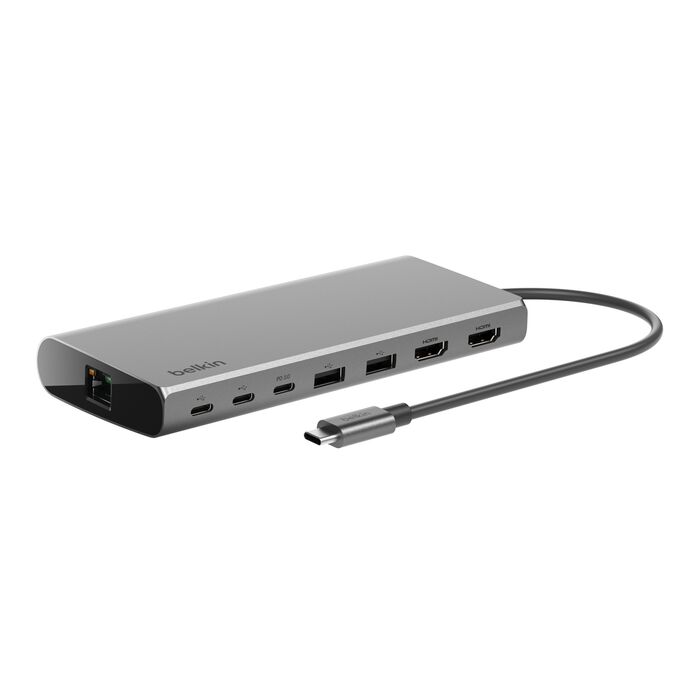
The Belkin feels like the hub you buy when your laptop has become your workstation. The Anker feels like the hub you buy when your laptop just needs more ports.
That distinction matters more than most spec tables suggest.
Why These Two End Up in the Same Decision
Both products speak to the same buyer problem: modern laptops are thin, clean, and annoying.
You get one or two USB-C ports, then suddenly you need HDMI, Ethernet, USB-A, charging, maybe a second monitor, and some kind of cable sanity. The product category exists because laptop makers decided minimalism was your problem now. Very generous of them.
The Belkin and Anker options both promise a similar outcome:
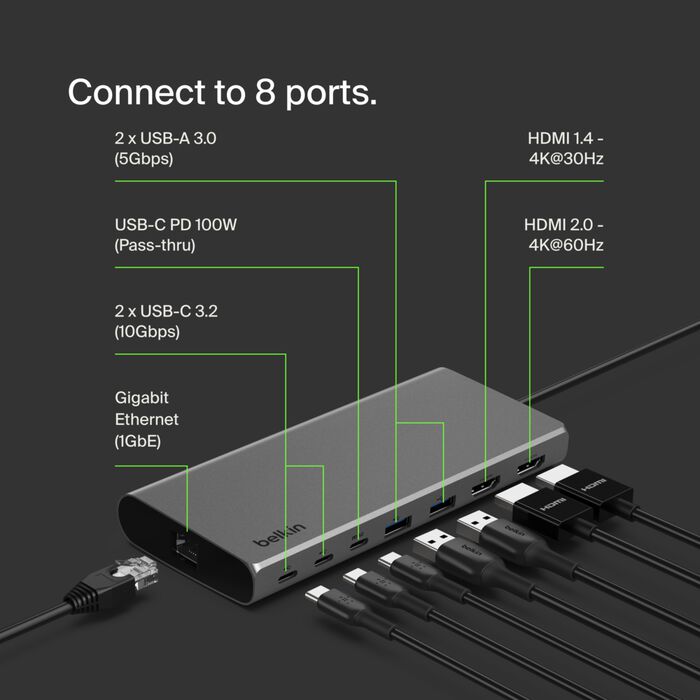
- connect external monitors
- keep the laptop charged
- add USB-A for older accessories
- add Ethernet for stable internet
- reduce desk cable chaos
- make a laptop feel more like a desktop
So yes, they compete. But they do not compete with the same attitude.
The Anker alternative says: “Here are the ports you need.”
The Belkin says: “Here is a more deliberate desk setup.”
The Philosophical Difference: Adapter Thinking vs Workstation Thinking
This is the most important difference between the two.
The Anker-style 8-in-1 hub is often the smarter version of an adapter. It gives you the essentials in a compact shape and usually makes sense for people who want flexibility without thinking too hard.
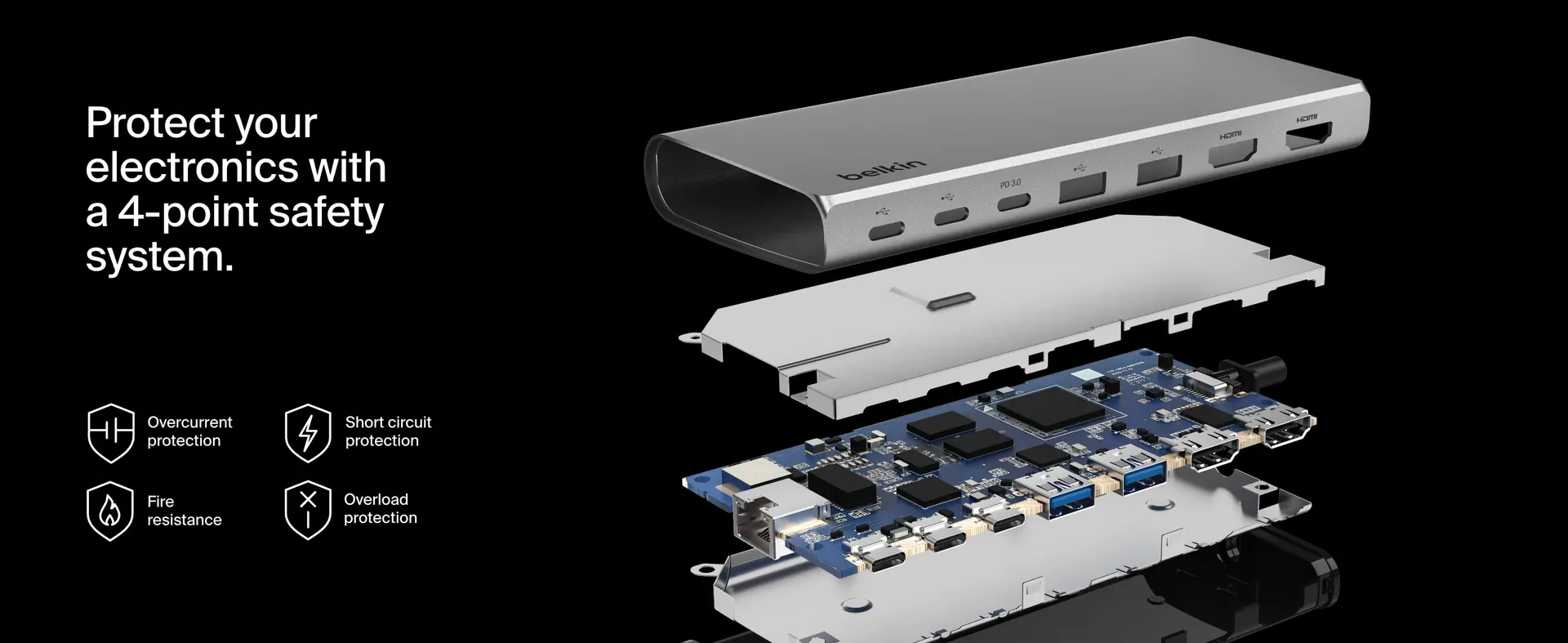
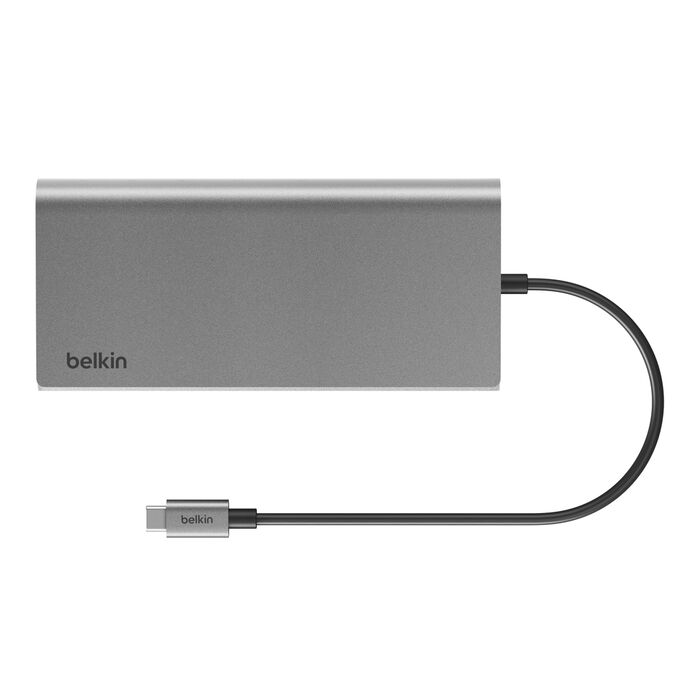
The Belkin Connect 8-Port Dual Display USB-C Hub feels more like a small workstation bridge. It is not trying to be flashy. It is trying to make dual-display laptop life feel more controlled.
With Anker, the question is usually “Does it have the port?” With Belkin, the better question is “Does it make the setup feel calmer?”
That is why the Belkin makes more sense for a desk where the hub stays connected most of the time. The Anker makes more sense for a bag, a shared family laptop, a student setup, or someone who only needs dual displays occasionally.
Which One Feels Smarter for Budget-Focused Buyers?
For budget-focused buyers, the obvious answer is usually the Anker-style alternative.
Not because Belkin is useless. Not because cheaper automatically means smarter. But because many people buying a USB-C hub do not need the most refined version of this category. They need HDMI, charging, USB-A, and maybe Ethernet. That is it.
If the buyer’s real use case is simple, the cheaper option is often enough.
The Anker-style hub feels smarter if you mostly need:
- one external monitor most of the time
- occasional dual display use
- a compact travel-friendly adapter
- USB-A ports for accessories
- Ethernet only when Wi-Fi is unreliable
- basic desk expansion without building a permanent workstation
For the buyer who just wants the missing ports back, the cheaper option has a very strong argument.
This is where Belkin can feel like the more serious answer to a problem the buyer may not actually have.
Which One Feels Smarter for Quality-Focused Buyers?
For quality-focused buyers, the Belkin becomes much more interesting.
This is not only about “premium brand versus cheaper brand.” Anker is not some random no-name option; it has earned trust in chargers, cables, power banks, and hubs. But Belkin often appeals to buyers who want the accessory to feel more at home in a professional setup.
The Belkin makes more sense when the hub is not a temporary fix. It is part of the desk.
That means:
- connected every day
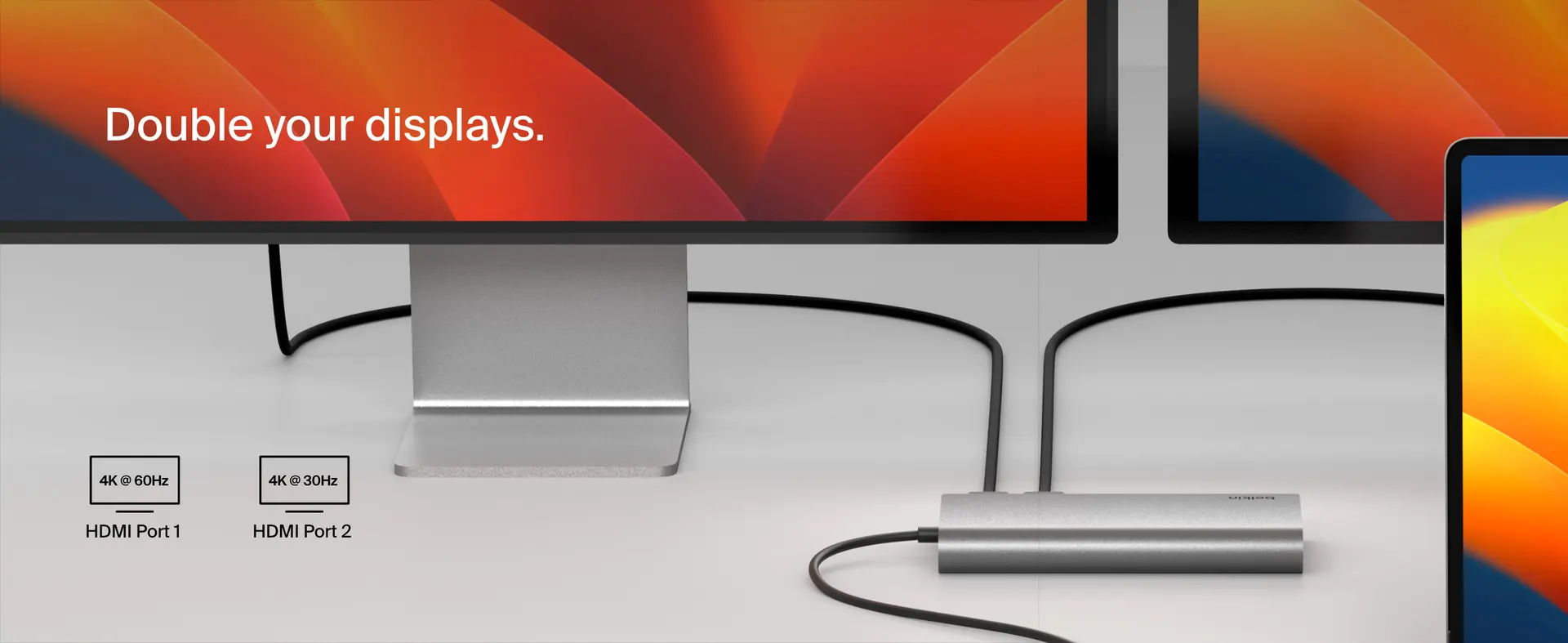
- used with two monitors often
- powering the laptop regularly
- handling Ethernet and peripherals
- staying visible on the desk
- expected to behave predictably
The more permanent the setup becomes, the more Belkin’s calmer, more office-oriented personality starts to matter.
A cheaper hub can be good. But if you are going to plug into it every morning and rely on it for your actual workday, the question shifts from “Can it do this?” to “Do I trust it as part of my routine?”
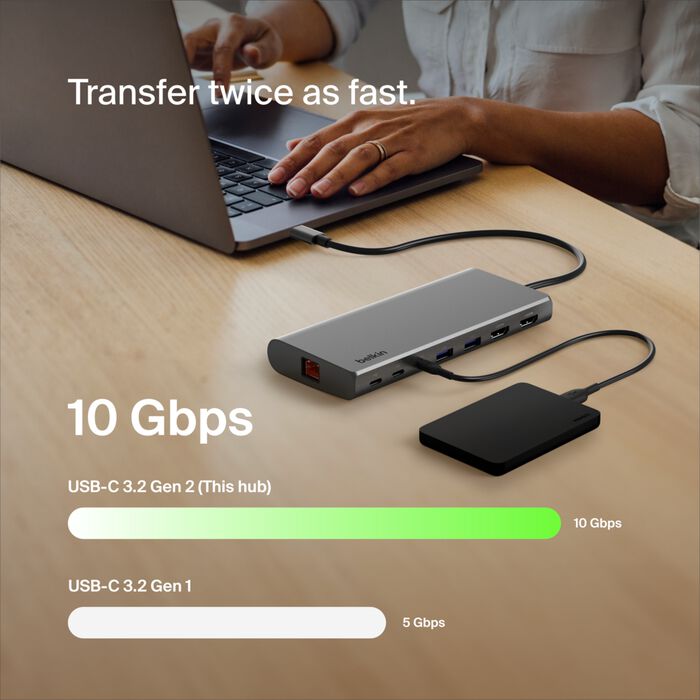
Simpler Setup: Anker Usually Wins
If your setup is simple, Anker is hard to argue against.
A student with a laptop and one monitor. A remote worker who occasionally connects to a TV. A traveler who wants ports in a backpack. A home user who only needs USB-A and HDMI once in a while.
In those situations, Belkin may feel like buying a proper office chair when all you needed was a folding stool. Comfortable? Sure. Sensible? Maybe not.
| Simple Setup Need | Better Fit |
|---|---|
| Laptop + one monitor | Anker |
| Occasional second screen | Anker |
| Travel bag accessory | Anker |
| Basic USB-A + HDMI expansion | Anker |
| Lowest sensible spend | Anker |
The Anker alternative suits people who want usefulness without making the hub a “system.”
If your hub lives in your backpack more than on your desk, the Anker-style option is probably the more natural pick.
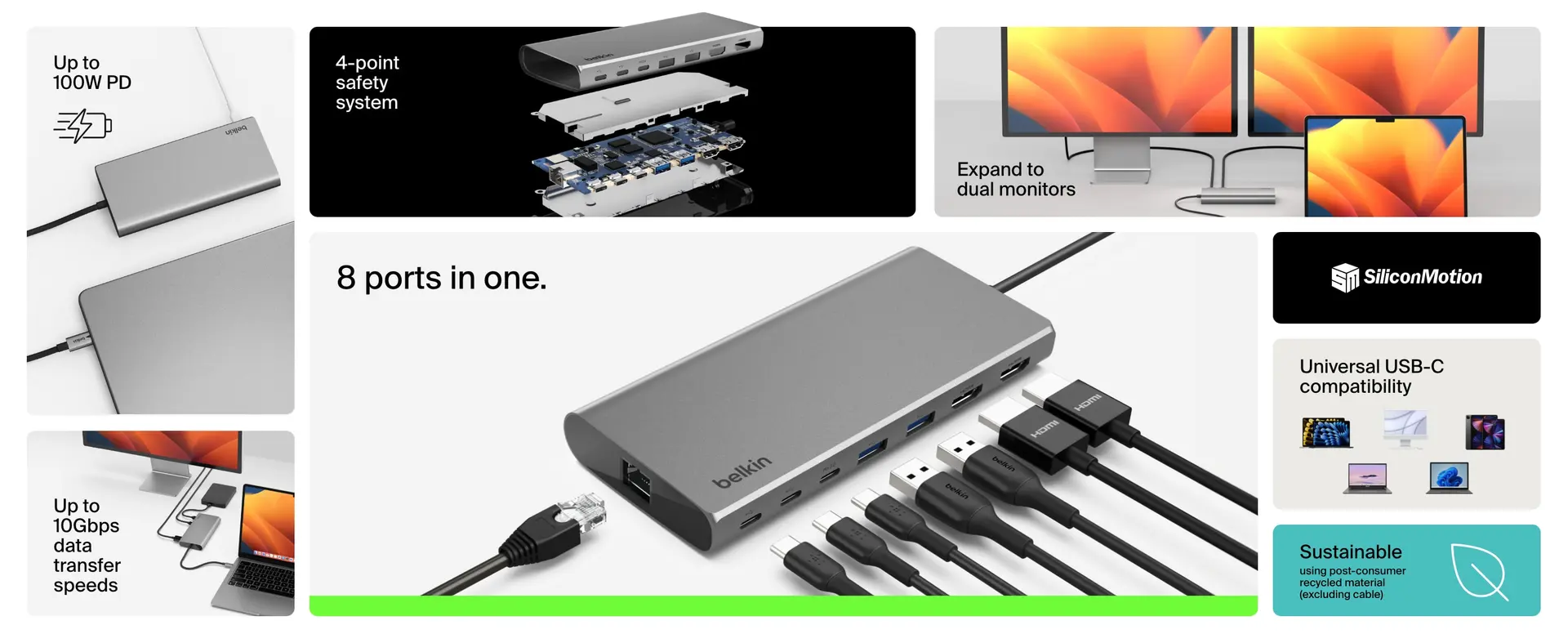
Demanding Use: Belkin Starts to Make More Sense
The Belkin becomes more convincing when the buyer is using the hub as part of a serious workspace.
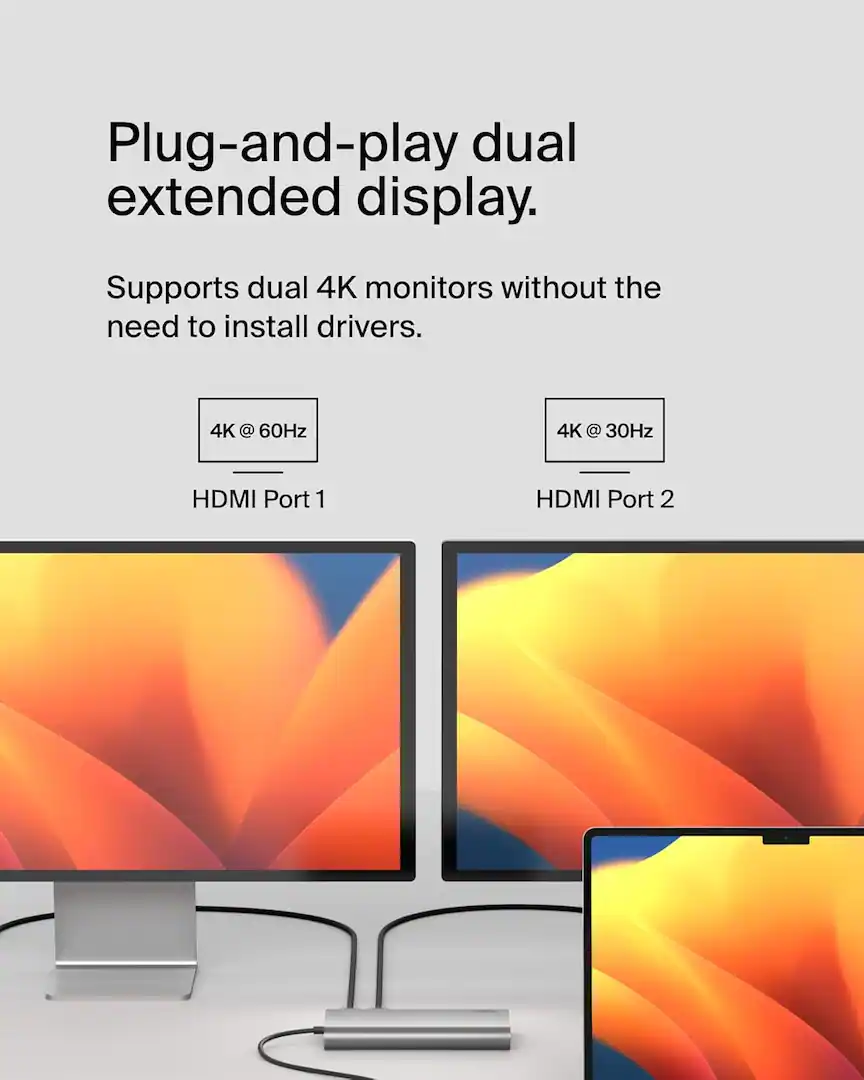
Dual monitors are the key here. A dual-display hub is not just a port expander anymore. It becomes part of how your work environment behaves.
If you are using two external screens for spreadsheets, dashboards, browser research, trading charts, coding, design layouts, writing workflows, or office multitasking, the hub’s role becomes more important. It is no longer just “nice to have.” It becomes the small box everything depends on.
Belkin feels better suited for:
- permanent dual-monitor desks
- office users
- hybrid workers
- laptop-as-desktop setups
- users who care about clean cable behavior
- buyers who want a more composed accessory
This is where the Belkin earns its place.
A dual-display hub used every day should not feel like a temporary adapter. That is the Belkin argument in one sentence.
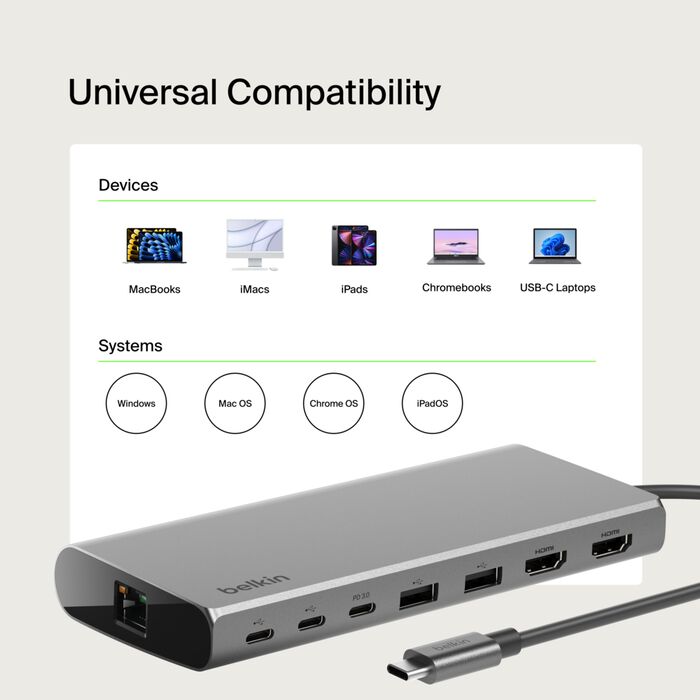
Where Belkin Wins Clearly
Belkin wins when the buyer wants a more refined work-desk experience.
Not because every port is automatically superior. Not because the Anker alternative is weak. But because Belkin’s design logic feels closer to a product meant to stay in place and support a daily workflow.
The clearest Belkin advantages are:
- better fit for a fixed desk
- more professional product feel
- stronger workstation personality
- less “travel adapter” energy
- better match for dual-monitor seriousness
- more convincing for office environments
The monitor privacy button also gives Belkin a practical workplace advantage. Being able to quickly cut connected displays is not a feature everyone needs, but for people who work around others, present often, or handle private information, it is the kind of small detail that feels thoughtful.
Belkin wins when the hub is part of your work environment, not just something you pull out when your laptop runs out of ports.
That is the cleanest case for choosing it.
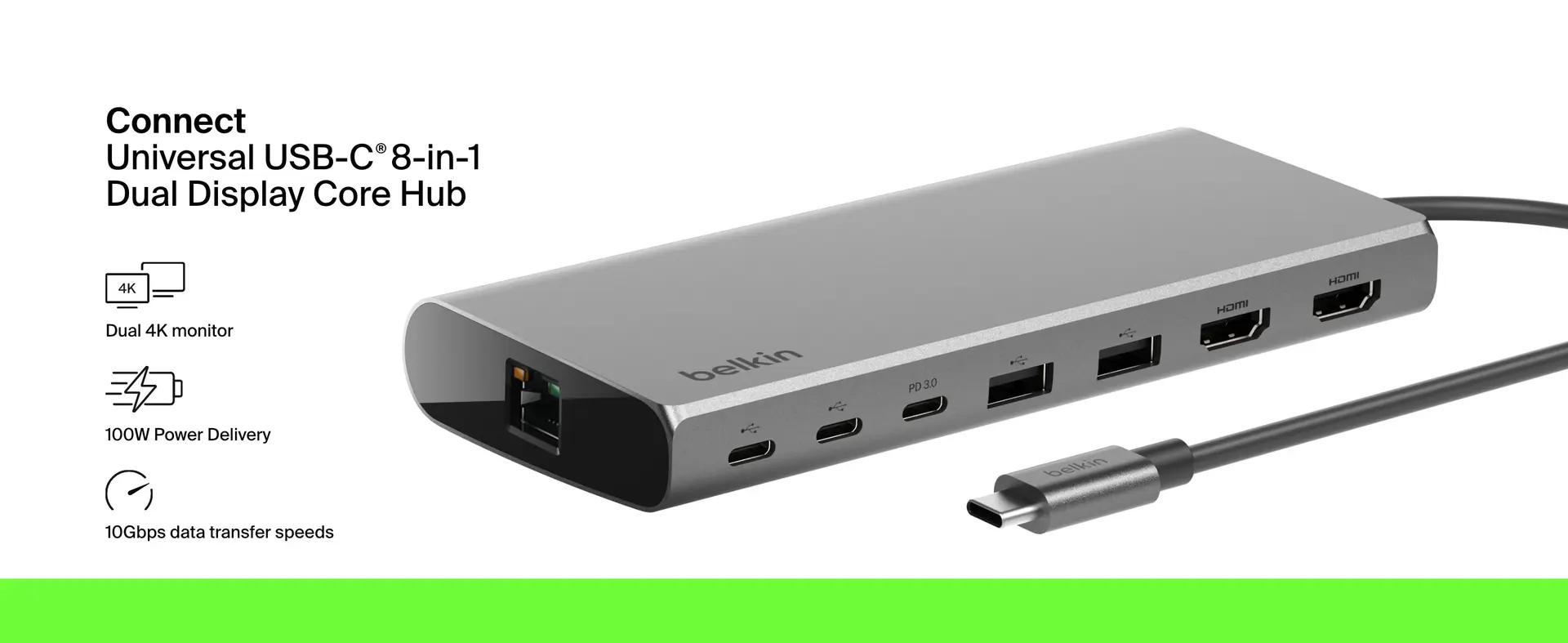
Where Anker Quietly Offers Better Judgment
Anker wins when the buyer does not need the Belkin’s more serious desk personality.
This is the part buyers often ignore because premium accessories are easy to romanticize. A better-feeling product is not always the better purchase. Sometimes the better purchase is the one that does the job, costs less, and disappears into your routine.
The Anker-style hub quietly offers better judgment when:
- you do not use dual monitors daily
- you care more about price than desk polish
- you want something smaller and lighter
- you already own a separate charger
- you are not building a full workstation
- your laptop setup changes often
The Anker alternative is not the emotional choice. It is the practical one. And practical wins more often than product marketing would like to admit.
For many buyers, that is enough.
Which Differences Matter in Practice?
Some differences matter every day. Others only look important in comparison tables.
Differences That Actually Matter
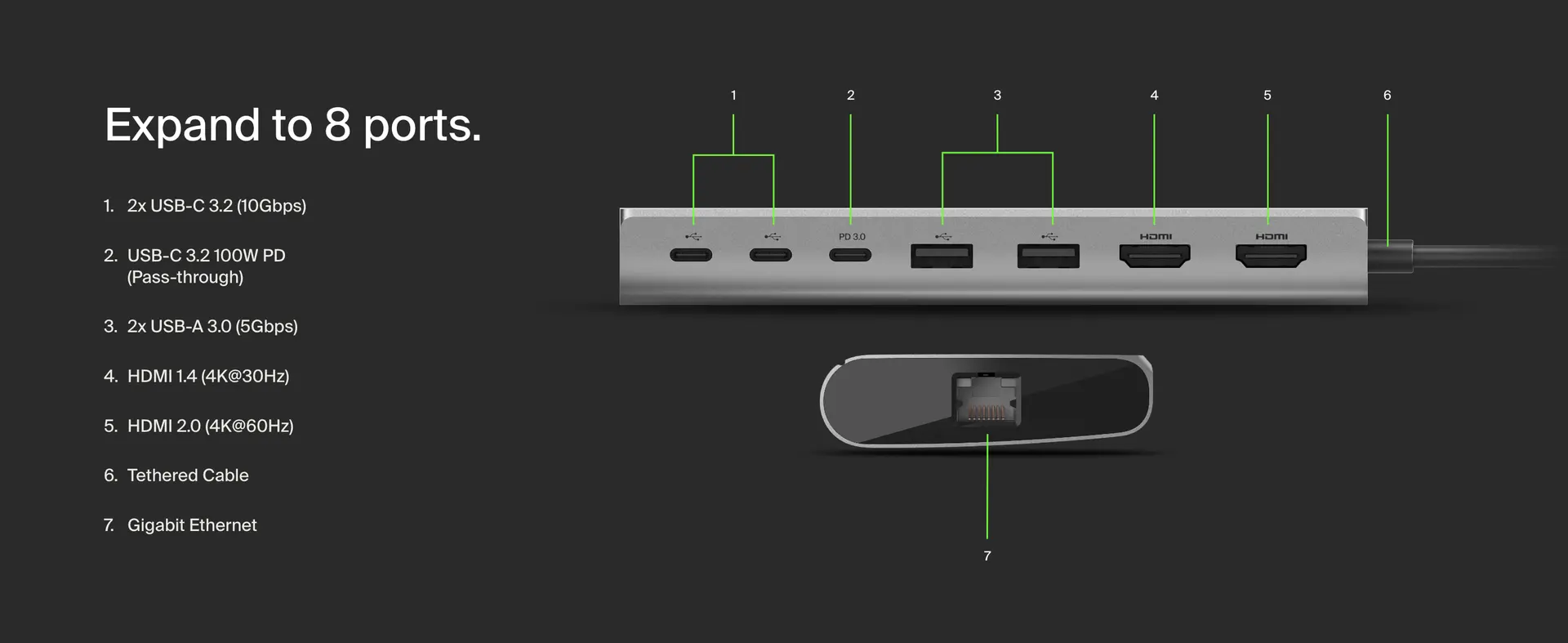
| Difference | Why It Matters |
|---|---|
| Dual-display behavior | This affects real multitasking, especially for work setups |
| Power delivery | Determines whether your laptop stays charged while everything is connected |
| Ethernet | Important for stable work, calls, uploads, gaming, or trading |
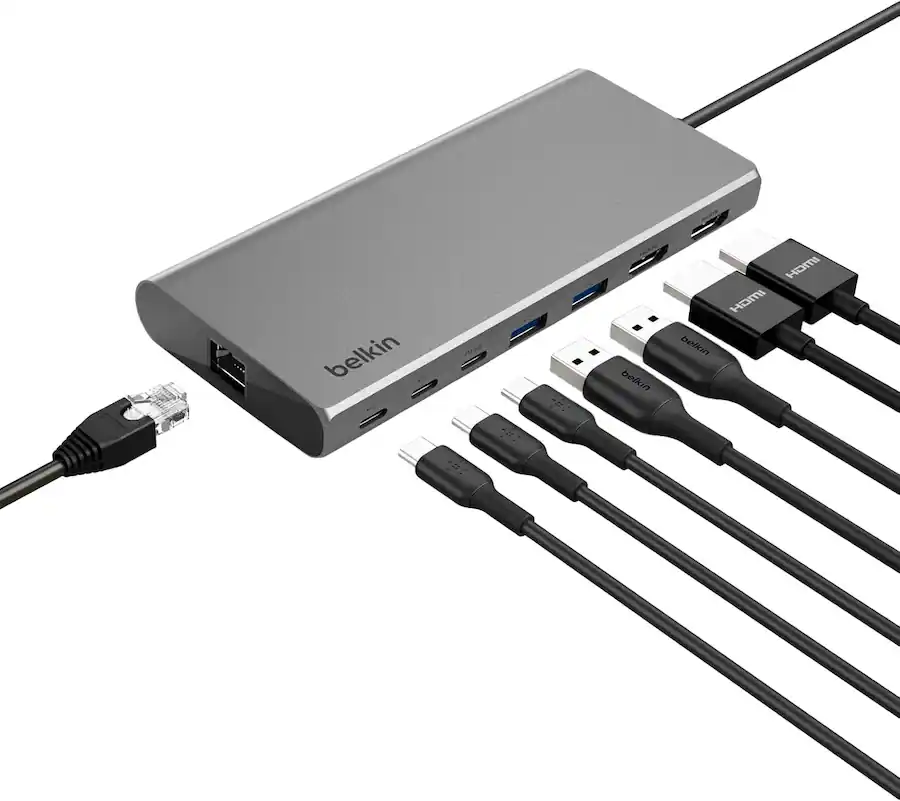
| USB-C and USB-A mix | Decides whether your current accessories fit without extra adapters |
| Physical design | Matters more if the hub lives permanently on the desk |
| Monitor privacy control | Useful for office/privacy-heavy environments |
Differences That Matter Less Than Buyers Think
| Difference | Why It May Not Matter Much |
|---|---|
| Tiny size differences | Unless you travel with it often |
| Brand loyalty | Both brands are credible enough for normal buyers |
| Maximum theoretical speeds | Many users never push the hub hard enough to notice |
| Port count alone | The right ports matter more than more ports |
| “Premium” feel | Nice, but only worth paying for if it improves your routine |
This is why the Belkin-versus-Anker decision should not be treated like a spec war. The smarter question is not “Which has more?” It is:
“Which one matches the way I actually use my laptop?”
That is where the answer becomes obvious.
How the Decision Changes by Buyer Priority
| Your Priority | Smarter Pick | Why |
|---|---|---|
| Lowest sensible cost | Anker | It usually covers the basics for less |
| Daily dual-monitor desk | Belkin | It feels more aligned with a permanent setup |
| Travel and portability | Anker | Smaller, simpler, easier to carry |
| Professional desk appearance | Belkin | Better workstation personality |
| Occasional home use | Anker | Belkin may be overkill |
| Privacy-conscious office use | Belkin | The display control feature has real value |
| Maximum simplicity | Anker | Less mental commitment, easier purchase |
| Long-term desk confidence | Belkin | Better fit for repeated daily use |
The Belkin is not automatically the better product for everyone. The Anker is not automatically the cheap compromise. Each one becomes smarter under different priorities.
Is the Cheaper Option Actually Enough?
For many people, yes.
The Anker-style 8-in-1 dual HDMI hub is probably enough if your needs are normal:
- connect one or two displays
- charge through USB-C
- use a mouse, keyboard, or flash drive
- plug into Ethernet occasionally
- carry the hub between places
- avoid spending more than necessary
That buyer does not need to overthink it. The cheaper option solves the real problem.
If your hub is mostly there to replace the ports your laptop should have had in the first place, the Anker-style option is likely enough.
And that is not a weak recommendation. It is a sensible one.
The mistake is buying Belkin because it feels more “serious” when your actual usage is light. Serious tools only make sense when your routine is serious enough to benefit from them.
Does the Pricier Option Earn Its Extra Cost?
The Belkin earns its extra cost only when the buyer values the whole setup, not just the port list.
If you use your laptop like a desktop machine, the hub becomes more important. It has to sit there, handle displays, support accessories, pass power, keep the desk clean, and make the connection process feel predictable.
That is where paying more becomes easier to justify.
Belkin earns its premium when:
- dual monitors are part of your normal workday
- the hub stays on your desk
- you care about a cleaner, more controlled setup
- display privacy matters
- you dislike cheap-feeling accessories in a professional workspace
- you want the hub to feel like infrastructure, not an emergency adapter
The Belkin is easier to justify when you stop seeing it as a dongle and start seeing it as the center of your laptop desk.
That is the real premium.
Not luxury. Not status. Just better alignment with a more permanent setup.
Buyer Match: Who Should Choose Which?
Choose the Belkin Connect 8-Port Dual Display USB-C Hub if you are:
- building a serious laptop desk
- using two monitors frequently
- working from the same setup most days
- relying on Ethernet, charging, displays, and peripherals together
- sensitive to cable clutter
- willing to pay more for a calmer daily experience
- someone who wants the hub to feel like part of the workstation
Choose the Anker 8-in-1 Dual HDMI Hub if you are:
- trying to spend less
- using a simpler setup
- carrying the hub around
- connecting displays occasionally
- mostly needing HDMI, USB-A, Ethernet, and charging
- not too concerned with desk permanence
- looking for the best practical value
Neither choice is foolish. The foolish move is buying the wrong one for the wrong reason.
The Most Honest Recommendation
The Belkin Connect 8-Port Dual Display USB-C Hub is the better pick for someone building a real dual-monitor workstation around a USB-C laptop. It feels more at home when the hub is always connected, always visible, and always part of the workday.
The Anker-style 8-in-1 dual HDMI hub is the better pick for people who simply want useful expansion at a more reasonable price. It is the more obvious value choice, especially for lighter setups and buyers who do not need the hub to feel like a permanent desk component.
Buy the Belkin if your laptop is your workstation. Buy the Anker if your laptop just needs more ports.
That is the decision.
Not premium versus cheap. Not brand versus brand. Not spec theater.
It comes down to whether you are buying a desk foundation or a portable problem-solver.
For demanding daily dual-display work, the Belkin makes more sense. For most ordinary buyers who just want capable connectivity without paying extra for a more polished setup, the Anker alternative is probably enough — and sometimes “enough” is exactly the smartest purchase.
Explore the Belkin Connect 8-Port Dual Display USB-C Hub Gallery
Every image from this article, gathered in one clean place. Tap any photo to open it larger.