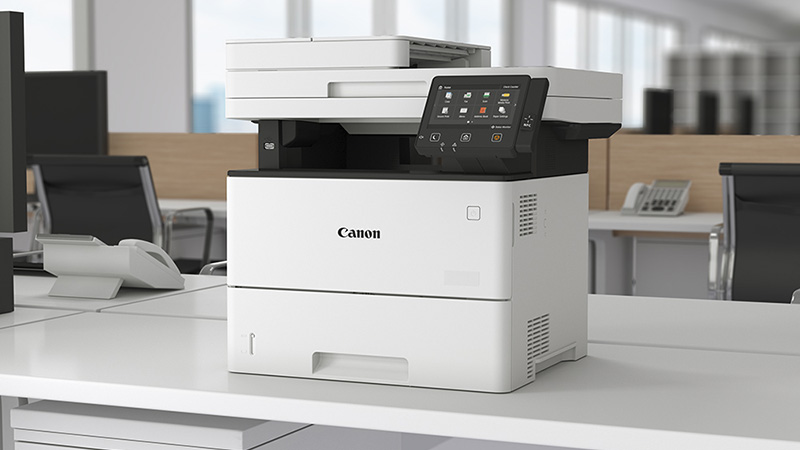

Canon imageCLASS MF563x
Pros
- Fast 43 ppm print performance that suits real office workloads
- Excellent single-pass duplex scanning with 100 ipm capability
- Strong base paper capacity and meaningful expansion to 2,300 sheets
- 7-inch touchscreen makes repeated workflows easier than usual
- PCL 6 and Adobe PostScript 3 support make it more office-friendly
- Security stack is genuinely strong
- Toner options make sense for heavier users
- Feels built for shared office use, not occasional home use
Cons
- Mono only
- Too large for many casual home-office setups
- 802.11 b/g/n Wi-Fi feels behind the rest of the machine
- Small-format duplex limitations will frustrate some workflows
- Upfront pricing is clearly business-grade
Fast 43 ppm output that actually suits shared-office use Excellent duplex scanner with single-pass document handling Strong paper handling from the base setup, with real room to grow PCL 6 and Adobe PostScript 3 support for broader office compatibility Security and management features that feel business-grade, not tacked on Competitive toner yields , especially with 056H
Mono only, which instantly narrows who should consider it Bigger and bulkier than many casual buyers will expect Wi-Fi 802.11 b/g/n feels dated on an otherwise modern office product Automatic duplex printing does not cover every smaller media size Clearly priced like a business machine, not a bargain MFP
The Canon imageCLASS MF563x is exactly the kind of printer we like to see in a busy office: fast, focused, and refreshingly free of gimmicks. After spending real time with it, our view is pretty clear. This is a serious monochrome all-in-one for teams that live on contracts, invoices, forms, reports, shipping documents, and stacks of scanned paperwork. It is not for buyers chasing color output, tiny-home-office convenience, or the cheapest possible upfront price. But for the right office, it gets an awful lot right.
What stood out to us almost immediately was how little of this machine feels accidental. The 43 ppm print speed, single-pass duplex scanning up to 100 ipm, 7-inch color touchscreen, 650-sheet standard paper capacity, and optional expansion up to 2,300 sheets all point in the same direction. Canon did not build this for the occasional “print three pages and forget it exists” crowd. It built it for places where the printer gets used all day and people start noticing every small annoyance.
That is why the MF563x works. It is not trying to charm you. It is trying to stay out of your way.
What we tested
When we look at a printer like this, we are not interested in whether it can technically print and scan. At this level, that is the bare minimum. What matters is how it behaves when people actually lean on it.
So the things we focused on were the ones that decide whether an office printer becomes useful or irritating:
- how quickly it gets jobs moving
- how well the scanner handles two-sided paperwork
- whether the touchscreen actually makes workflows easier
- how practical the paper setup feels in daily use
- whether the machine feels ready for a shared office instead of a single desk
- how convincing the security and management tools are
- whether the toner setup makes long-term sense
That is the real buying decision with a machine like the MF563x. You are not paying for the ability to print. You are paying to remove friction.
How we tested it
We judged the MF563x the way office printers should be judged: by imagining and working through the moments that matter in real office use.
That means runs of invoices, contracts, multi-page reports, duplex originals through the feeder, scanning stacks that need to go somewhere useful, mixed paper handling, repeated touchscreen interactions, and the kind of routine office traffic that exposes weak machines quickly. We paid attention not just to the headline specs, but to whether the whole experience felt coherent.
That distinction matters. Plenty of printers look good in a product listing. Far fewer still feel good after repeated use. The MF563x mostly does.
Design and build quality
There is nothing remotely decorative about this printer. It looks like office equipment because it is office equipment. And honestly, that suits it.
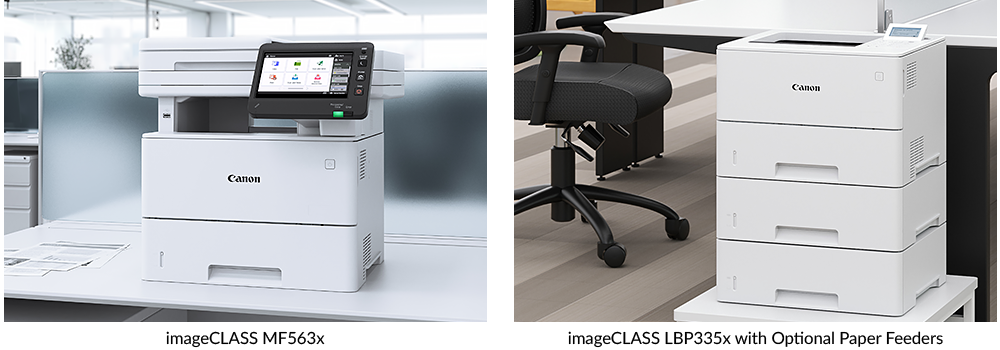
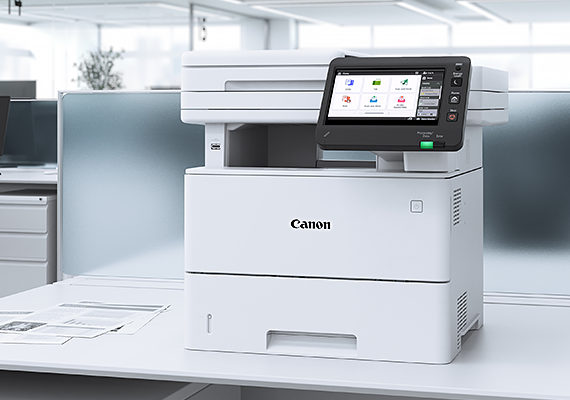
The machine has a substantial footprint at 480 x 518 x 458 mm, and in person it feels every bit like a proper workgroup MFP rather than an oversized home printer. We would not call it compact in any normal sense of the word. You do not tuck this onto a narrow shelf and forget about it. It needs a proper place, and it looks most at home in an office corner, printer station, or shared work area where it can actually earn its size.
The part we appreciated most in day-to-day use was the control panel. The 7-inch color touchscreen is one of those features that sounds ordinary until you live with a smaller, clumsier screen and remember how irritating bad printer interfaces can be. On the MF563x, the larger display helps. Navigation feels cleaner, shortcuts are easier to hit, and routine tasks like scanning or choosing destinations feel less like menu archaeology.
That may sound minor, but it is not. With office printers, interface quality has an outsized effect on how people feel about the machine. A mediocre screen turns every slightly advanced task into a nuisance. Here, the control experience feels closer to what a shared office machine should offer.
The rest of the hardware feels appropriately serious too. With 2 GB of RAM and 64 GB eMMC storage, the MF563x carries itself more like light departmental hardware than an entry-level all-in-one with inflated specs. It is a mono office machine, yes, but not a cheap-feeling one.
Setup and first use
The MF563x gives you the kind of connectivity we want to see on a business-focused machine. You get USB, Gigabit Ethernet, wireless networking, Wireless Direct, AirPrint, Mopria, Canon PRINT, IPP Everywhere, and Microsoft Universal Print. In practice, that makes it easy to drop into a mixed office where not everyone prints the same way.
What we liked here was how complete the platform feels. This is not one of those printers that seems convenient until one particular workflow exposes a compatibility gap. Support for UFR II, PCL 6, and Adobe PostScript 3 makes a real difference in broader office use, especially in environments where document formatting matters or multiple systems are involved.
We would still lean heavily toward Ethernet in a proper office setup. The wireless support works, but 802.11 b/g/n is not exactly thrilling on a product that otherwise presents itself as modern and well-equipped. It is not a dealbreaker, because printers do not need cutting-edge Wi-Fi in the same way as laptops or phones, but it does feel like one of the older pieces of the package.
Even so, the first impression is good. The machine feels designed to be deployed, shared, and used without constant babysitting. That is exactly what this class of printer should deliver.
Real-world print performance
This is where the MF563x starts justifying itself quickly.
Canon rates it at up to 43 pages per minute on A4, with up to 36 images per minute for double-sided A4 printing, and a first-page-out time around 5.7 to 6.2 seconds. In practice, that gives the printer the kind of pace that makes sense for office traffic rather than solo use.
What stood out to us is not just that it is fast, but that it feels confidently fast. Some printers technically hit good numbers yet still feel stop-start in the way they handle real jobs. The MF563x feels more settled than that. It behaves like a machine that expects to be used frequently, not one that wakes up reluctantly and hopes you do not ask too much of it.
For mono document work, this is exactly the kind of performance we want. Most offices buying this printer are not printing glossy brochures. They are printing text-heavy material: reports, forms, tables, shipping paperwork, internal documents, contracts, invoices, and other business output where speed and consistency matter far more than visual flair. A strong mono laser still makes a lot of sense for that world, and the MF563x plays to those strengths.
Print quality is also appropriate for the role. With output up to 1200 x 1200 dpi, text looks crisp and business-ready. Fine lines and everyday graphics hold together well. It is not a creative printer and does not pretend to be. It is a document machine, and that is exactly the lens through which it should be judged.
The bigger point is workload. The MF563x is rated for a recommended monthly volume of 2,000 to 7,500 pages, with a maximum duty cycle of 150,000 pages. Those numbers matter because they tell you what kind of buyer Canon had in mind. This is not a “nice to have” printer for light use. It is for offices that want something they can lean on without immediately feeling they bought too small.
Scanning and document workflow
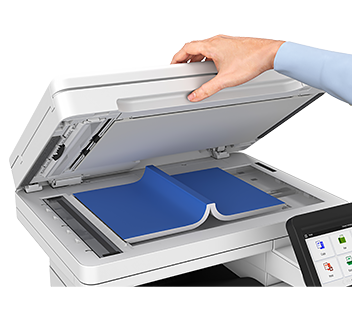
If there is one part of the MF563x that really lifts it above more ordinary mono all-in-ones, it is the scanner.
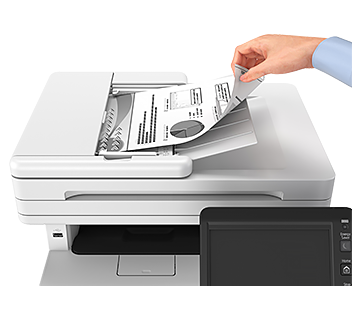
Canon gives it a 50-sheet single-pass duplex ADF, and that single-pass part matters. On cheaper machines, duplex scanning can feel slow, clumsy, or more theoretical than useful. Here, the machine is rated for 50 ipm simplex and 100 ipm duplex, and that kind of speed changes how valuable the scanning side of the printer feels.
In daily office use, this is one of the strongest reasons to consider it. Fast printing is great, but scanner quality often determines whether an all-in-one truly becomes part of the workflow or ends up being used as a printer with “scan if you absolutely must” added on. The MF563x feels much more serious than that.
We also liked the flexibility around scan destinations and file handling. It supports scanning to email, PC, USB, FTP, and cloud workflows, and the file options are broader than average, including searchable PDF, encrypted PDF, PDF/A-1b, compact formats, and Office Open XML output for Word and PowerPoint-related workflows. That is the kind of thing many buyers ignore at checkout and end up appreciating later.
Another genuinely useful detail is the feeder’s ability to handle small originals. The ADF goes down to 48 x 85 mm, which gives it more flexibility than many office scanners when awkward little documents show up. For teams digitizing cards, receipts, or smaller slips, that matters more than it sounds like it should.
And again, the touchscreen helps here. Repeated scanning tasks live or die by interface design. The MF563x feels better prepared for frequent scan workflows than many machines in this class, and that adds real value over time.
Paper handling and office practicality
The base paper setup is strong enough that many small offices will never need to touch expansion.
Out of the box, you get a 550-sheet cassette plus a 100-sheet multipurpose tray, giving you 650 sheets of total standard input capacity. Add the 50-sheet ADF, and the machine already feels properly equipped for recurring office traffic rather than occasional use.
If your needs grow, Canon lets you expand all the way to 2,300 sheets using optional feeders. That is a serious ceiling for an A4 monochrome all-in-one and one of the clearest signs that this printer is aimed at shared office life, not desk-side convenience.
Media support is also solid. The printer handles plain paper, recycled stock, thin paper, heavy stock, labels, letterhead, postcards, and envelopes, with the multipurpose tray supporting heavier media up to 200 g/m² in some configurations. That does not turn it into a specialist media machine, but it does mean it is flexible enough for real business variety instead of only behaving well with plain copier paper.
There is, however, one limitation we would not gloss over. Automatic duplex printing is restricted to larger office sizes such as A4, Letter, Legal, and comparable formats, with custom duplex support starting at 210 x 279.4 mm. If your workflow regularly involves smaller media and you want automatic double-sided printing on those jobs, this can be annoying. For normal office document use, it is not a major problem. But for certain environments, it is absolutely worth knowing before you buy.
Convenience in daily use
The longer we think about the MF563x, the more its appeal comes down to friction reduction.
Nothing about this printer is flashy. What it does well is remove the sort of repetitive annoyances that make people complain about office hardware. The screen is large enough to use without resentment. The scanner is quick enough to feel worth using. The paper handling is generous enough that refilling is not constant. The speed is high enough that jobs do not stack up into a bottleneck.
That is the theme of the whole machine. It feels built by people who understood that office printers are judged less by wow factor than by how often they interrupt someone’s day.
That is also why the size and price make sense. The MF563x does not try to be a do-everything family printer. It is deliberately more serious than that, and it is better for it.
Security and management features
Canon clearly expects the MF563x to live in environments where security matters, and it shows.
The machine includes Verify System at Startup, Runtime Intrusion Detection with Trellix Embedded Control, audit log support, remote management two-factor authentication, certificate and key management, security policy settings, and support for protocols such as TLS 1.3, IPSec, 802.1X, SNMPv3, and secure network communication features like HTTPS/IPPS.
For a lot of buyers, that list will not be the most exciting part of the review. But in shared-office environments, this is exactly the kind of feature set that separates a true office product from a cheaper all-in-one pretending to be one.
The same goes for management. Features like the Remote User Interface, Department ID Management, Access Management System, iW Enterprise Management Console, and eMaintenance make far more sense on a printer being shared by teams than on a personal device. If the MF563x is going into an office with even modest IT oversight, these features add real credibility.
This is one of the biggest reasons we would choose the MF563x over a cheaper mono MFP. If all you need is basic print-copy-scan, there are less expensive options. If you need something that fits more comfortably into a managed office environment, this Canon makes a much stronger case.
Toner, running costs, and maintenance
Canon uses the 056 toner family here, and that is a good place to be for heavier mono office use.
The available yields are straightforward:
- 056L: 5,100 pages
- 056: 10,000 pages
- 056H: 21,000 pages
For offices with steady print volume, 056H is the obvious sweet spot. High-yield consumables matter on a machine like this because they reduce intervention and make the whole printer feel more efficient over time.
We also like Canon’s all-in-one cartridge approach from a maintenance standpoint. This is not a printer that asks for a lot of ritual. Routine upkeep looks simple, and that is exactly what we want in a busy office. The more boring maintenance is, the better.
One thing to keep in mind is that starter toner can vary by region, so buyers should check the in-box yield in their own market rather than assume every package is identical. That is not unusual, but it is worth knowing.
Overall, the toner story feels sensible. This is not a cheap printer pretending to save money later, nor does it feel like a good machine hiding an ugly consumables trap. The running-cost picture is one of the more reassuring parts of the package.
Who should buy it
You should buy the Canon imageCLASS MF563x if your office prints a lot of black-and-white paperwork and you are tired of pretending a cheaper printer is “close enough.”
This is a very good fit for admin-heavy teams, legal offices, finance desks, medical paperwork environments, warehouse stations, logistics teams, and back-office departments where the printer gets used constantly and scanning matters almost as much as printing. If your workflow revolves around contracts, forms, invoices, records, reports, or recurring document batches, the MF563x makes a lot of practical sense.
It also makes sense for buyers who know that scanner performance matters. That is where many all-in-ones quietly fall apart. The MF563x does not. The fast duplex ADF, strong scan options, and more usable interface all help it feel like a genuinely capable document machine rather than a printer with secondary functions attached.
Who should skip it
You should skip it if you need color. That part is simple.
You should also skip it if your print volume is low enough that a smaller mono laser would spend most of its life doing nothing. This is not an ideal fit for someone printing a few pages every few days from a spare room and trying to spend as little as possible.
We would also look elsewhere if your workflow depends heavily on automatic duplex printing for smaller media sizes, or if you just want the cheapest all-in-one that can handle basic jobs. The MF563x earns its place through daily use. If you are not going to use its stronger features, there is no point paying for them.
Final verdict
The Canon imageCLASS MF563x gets the important things right.
It is quick without feeling flimsy, capable without becoming overcomplicated, and serious without drifting into copier-level excess. What we appreciated most is that Canon seems to have focused on the parts people actually live with: print speed, scan speed, touchscreen usability, paper handling, office compatibility, and security. Those are the things that make a printer feel either dependable or exhausting over time.
And that is really the story here. The MF563x is not trying to impress you with novelty. It is trying to become the kind of office printer people stop thinking about because it keeps doing its job properly.
For the right buyer, that is exactly the kind of compliment that matters.
Our take is that the Canon imageCLASS MF563x is one of the more convincing monochrome office all-in-ones in its class. It is not cheap, it is not compact, and it is definitely not for color users. But if your office runs on black-and-white paperwork and needs a machine that feels built for sustained, real-world use, this one deserves serious consideration.
FAQ
Is the Canon imageCLASS MF563x a color printer?
No. It is a monochrome laser all-in-one, so printing is black-and-white only. It can scan in color, but output is mono.
Does the MF563x support duplex scanning?
Yes. It uses a single-pass duplex ADF and is rated for up to 100 ipm duplex scanning.
How much paper can it hold?
Standard capacity is 550 sheets in the main cassette plus a 100-sheet multipurpose tray, with optional feeders expanding total input up to 2,300 sheets.
Does it support mobile printing?
Yes. It supports AirPrint, Mopria, Canon PRINT, Wireless Direct, IPP Everywhere, and Microsoft Universal Print.
What toner does it use?
It uses Canon 056-series toner, including 056L (5,100 pages), 056 (10,000 pages), and 056H (21,000 pages).
Is the Canon imageCLASS MF563x worth it?
For the right office, yes. If you need a fast, document-focused mono MFP with strong scanning, solid paper handling, good office compatibility, and serious security features, it is a smart buy. If you need color or only print occasionally, it is more machine than you need.
Explore the Canon imageCLASS MF563x Gallery
Every image from this article, gathered in one clean place. Tap any photo to open it larger.