
Most docks solve a practical problem and create a visual one. They give a laptop more ports, more power, and more flexibility, but they also tend to look like the kind of accessory you want to hide behind a monitor as quickly as possible.
The Satechi Thunderbolt 5 CubeDock with SSD Enclosure does the opposite. After spending real time with it in a proper desk setup, what stood out to us most was not just that it worked well, but that it felt like a product designed for the way people actually use premium laptop workstations now: one cable, clean desk, fast storage, dependable charging, reachable ports, and no ugly plastic brick ruining the whole workspace.
Our verdict is simple. This is a very good dock for the right buyer. It is compact, thoughtfully designed, and genuinely more useful than the average “add some ports” box because it folds an M.2 NVMe SSD enclosure into the dock itself.
It also delivers the kind of connectivity that makes sense for a serious MacBook Pro or Windows creator setup, including Thunderbolt 5, up to 140W host charging, 2.5Gb Ethernet, UHS-II SD and microSD, and three downstream Thunderbolt 5 ports. But it is not a casual recommendation. At $399.99, this is a premium accessory with a premium niche. If your setup does not genuinely benefit from that mix of bandwidth, charging, and built-in storage, this can look like overkill very quickly.
Quick verdict
Best for: premium laptop desks, MacBook Pro and Windows workstation setups, creators who want fast local storage built into their dock, and anyone who cares about desk aesthetics almost as much as connectivity.
Avoid if: you mainly want a cheap port expander, need built-in HDMI or DisplayPort, or use a laptop that cannot really take advantage of Thunderbolt 5.
What we liked: the compact all-aluminum design, the front-facing convenience ports, the built-in SSD bay, the strong charging support, and the fact that it feels like part of the desk rather than something bolted onto it.
What disappointed us: the price is steep, the external power brick is big, there are no native display outputs, and Mac users still run into Apple’s own display limitations.
Final verdict: this is one of the most appealing premium docks we have used in a long time, but only if you actually need what makes it special.
What we tested
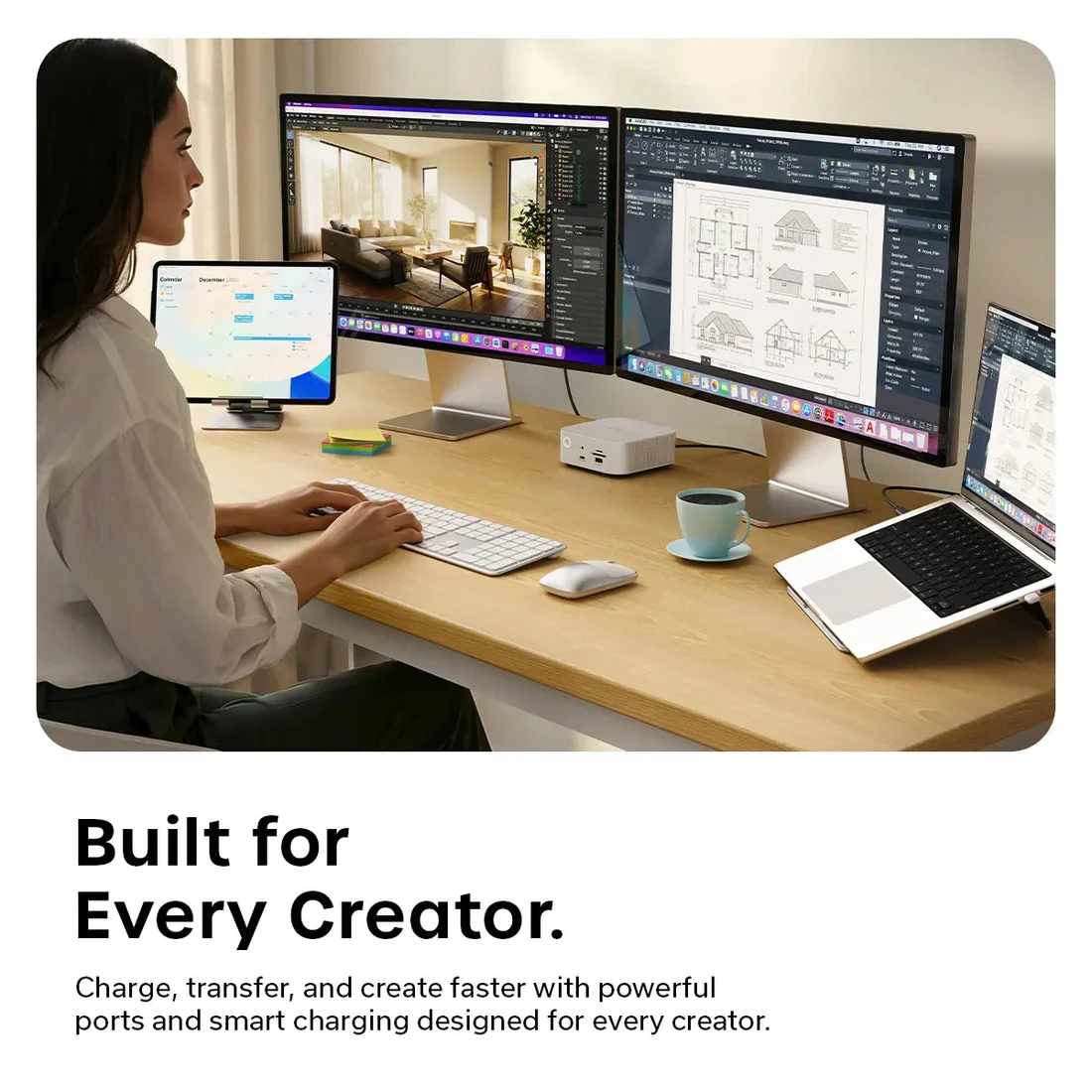
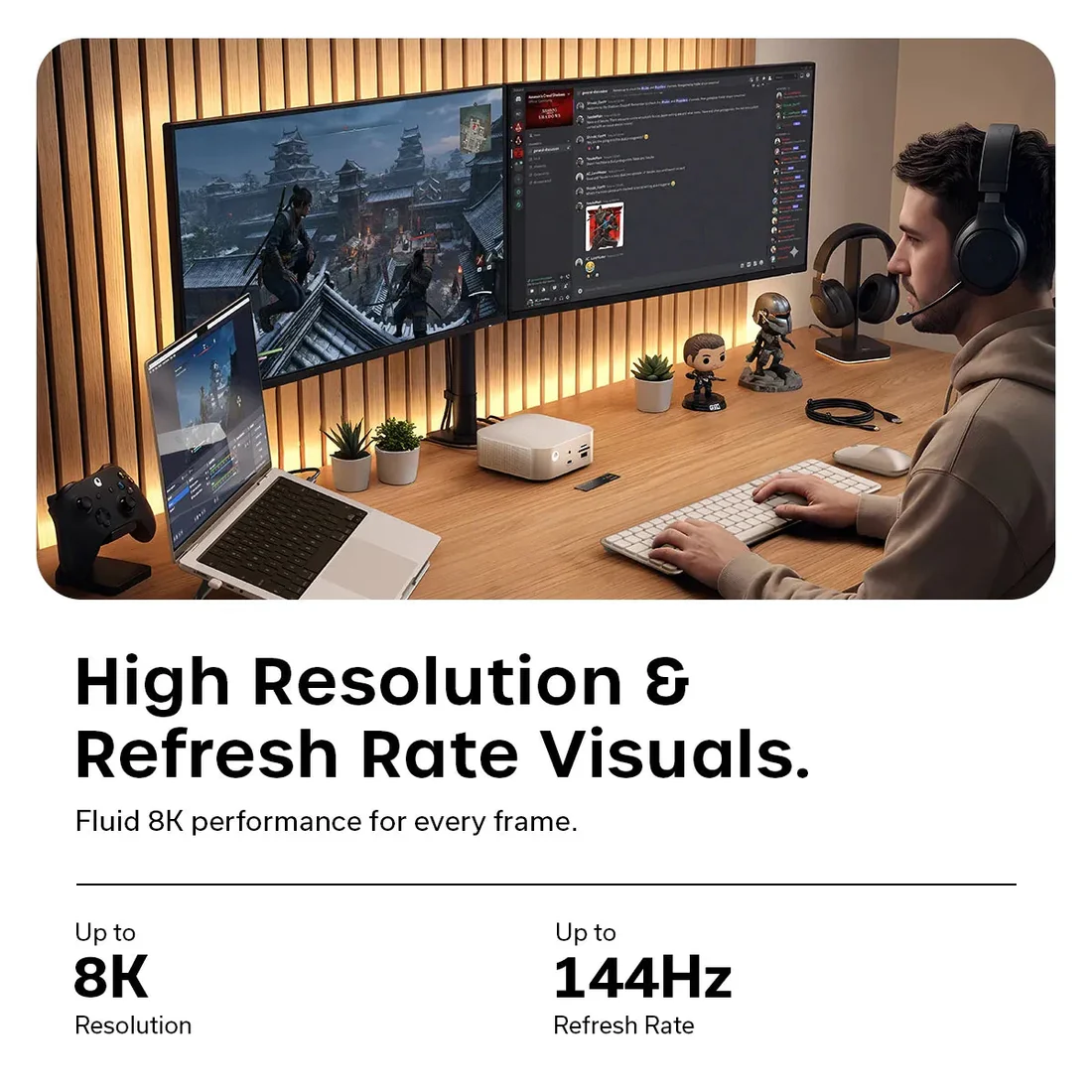
We used the CubeDock as part of a real desk setup over the course of a week, connected to a 16-inch MacBook Pro M5 Pro. During that time, we used it with:
- a Studio Display XDR
- a portable secondary monitor
- a Keychron Q1 Ultra 8K keyboard
- a Logitech trackball mouse
- SD and microSD access on the front
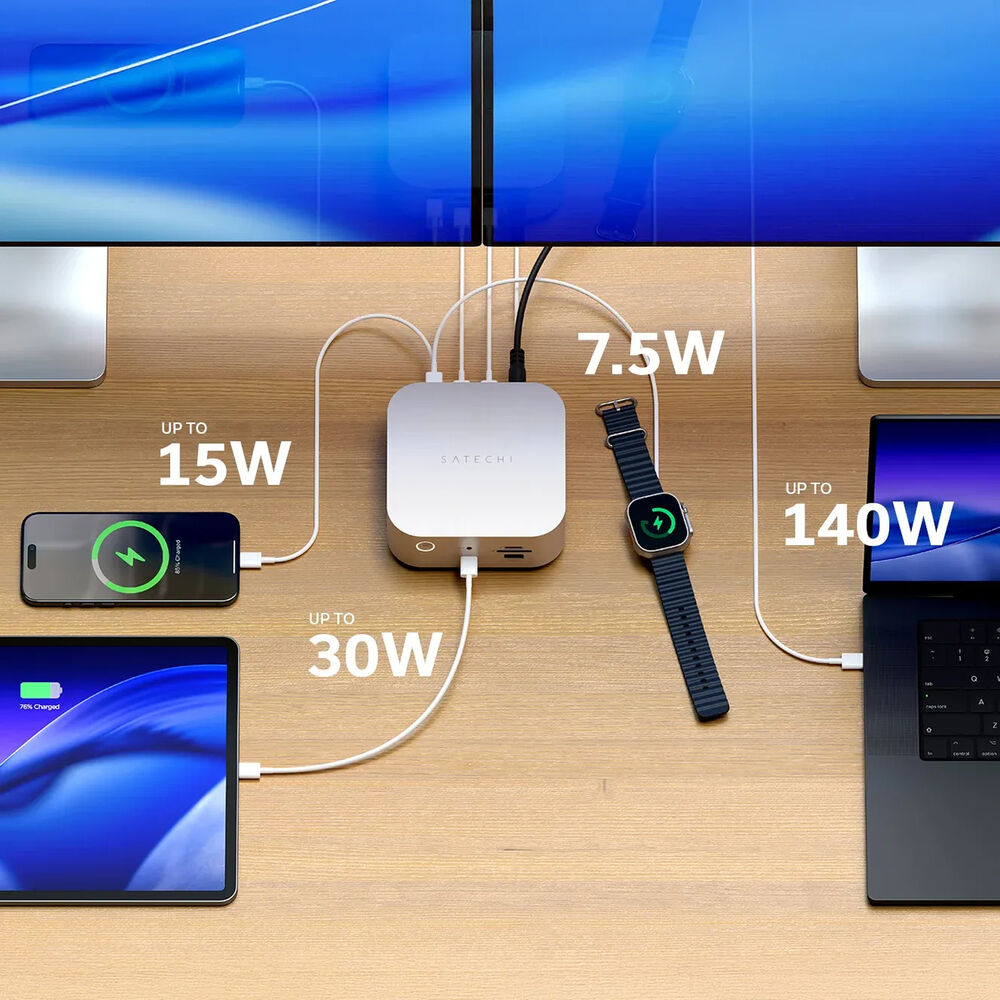
- the front USB-C port with 30W power delivery
- the rear Thunderbolt 5 ports
- the built-in underside M.2 NVMe SSD bay
That gave us a clear sense of what this dock is like not on a spec sheet, but in an actual workspace where it has to earn its spot.
How we tested it
We did not treat this like a quick plug-it-in-for-five-minutes accessory. We set it up the way most buyers actually would. We routed cables under the desk, paired it with a vertically docked laptop, used it as the hub for our daily keyboard and mouse setup, ran video through it, added a second display later in the week, and paid attention to all the small details that separate a good dock from an annoying one.
That meant looking beyond the headline specs. We cared about whether the front ports were convenient, whether the dock felt hot after long sessions, whether the power button was actually useful, whether the SSD access felt worthwhile, and whether the overall experience made our desk feel simpler or more cluttered. In practice, that is what matters most with a dock like this.
Design and build quality
The design is the first thing that sells the CubeDock, and Satechi knows it.
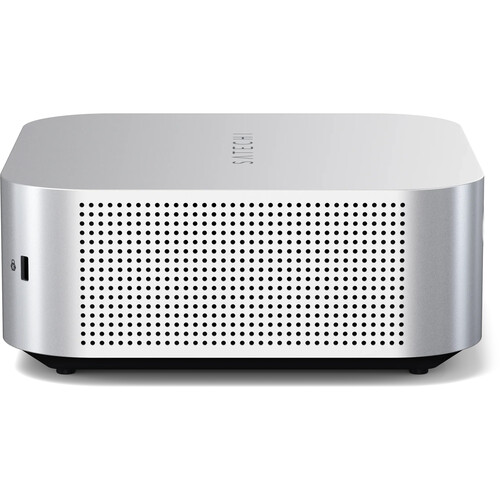
At 5 x 5 x 2.04 inches, it is compact enough to feel tidy on a desk without looking flimsy or compromised. The square aluminum shell immediately gives it a different personality from the usual long, dark docking bars that disappear into cable chaos. This looks more like a proper desktop accessory than a utility box, and that changes the experience more than people tend to admit.
On the desk, it has real presence. It looks clean, dense, and intentional. We found ourselves treating it less like infrastructure and more like part of the setup, which is exactly the right instinct for a product like this. A premium dock should not just disappear functionally. It should also fit visually. The CubeDock does.
The finish helps a lot. The aluminum body gives it a solid, high-end feel, and the overall shape makes sense for visible placement. We never felt tempted to hide it away. In fact, one of the more interesting things about using it was that it actually improved the look of the desk instead of making us negotiate with it. That is not something we say often about docks.
There is also a nice detail on the front: the power button surrounded by a white LED ring. It sounds minor, but it is exactly the kind of small design choice that makes a product feel considered. The button is easy to reach, easy to understand, and visually neat without being flashy.
Setup and first use
Getting started with the CubeDock was refreshingly straightforward.
The included 180W power supply is large, and there is no getting around that, but once we tucked it into the cable tray under the desk, the visible part of the setup stayed impressively clean. One upstream Thunderbolt connection to the MacBook Pro handled the main job, and from there the CubeDock became the center of the desk.
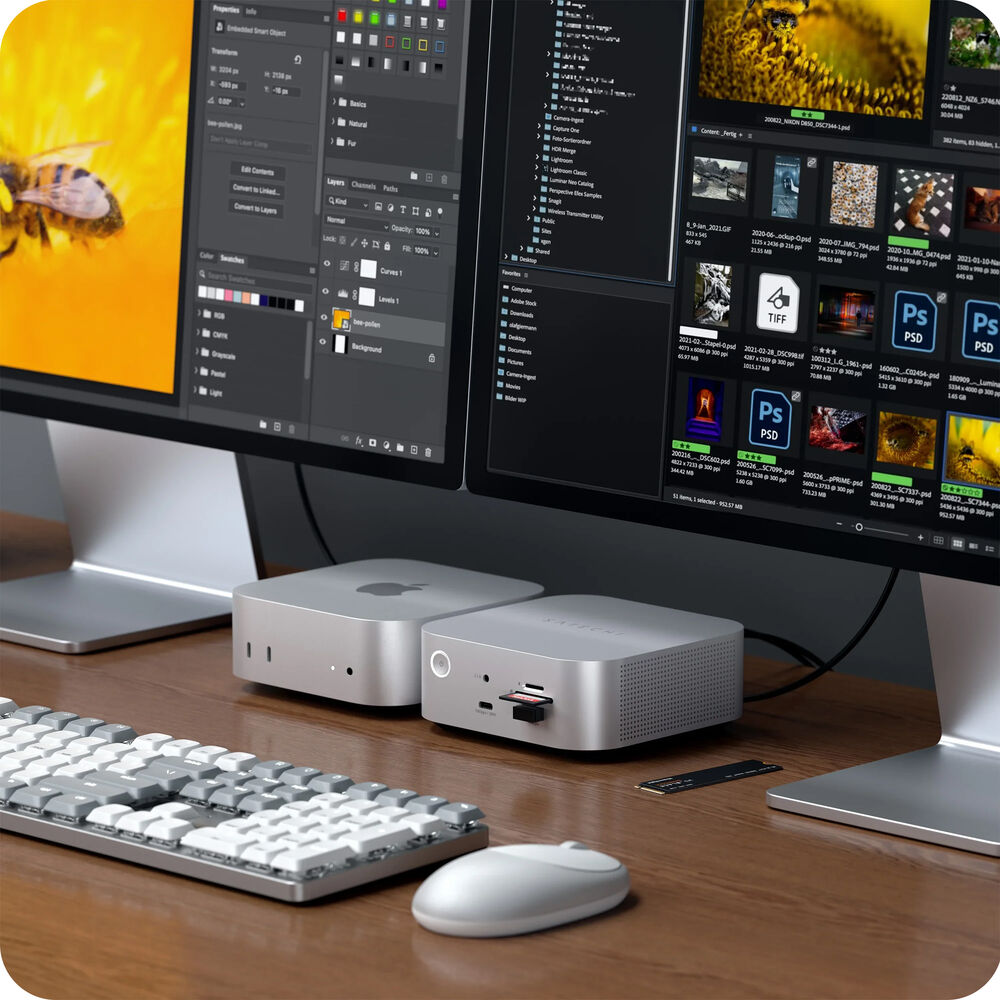
We paired the laptop with a vertical stand, kept the dock off to one side, and used it as the permanent landing spot for our peripherals and display connections. That is where the CubeDock immediately made sense. Once everything was connected, dropping the laptop into the setup felt tidy and fast in exactly the way a premium dock should.
The power button also ended up being more useful than expected. We appreciated being able to shut the dock down when we were not using it instead of leaving another always-on box glowing on the desk. It is a small quality-of-life touch, but after using it, we would miss it on other docks.
Ports and layout
The port selection is strong, but the layout is what makes the CubeDock easy to live with.
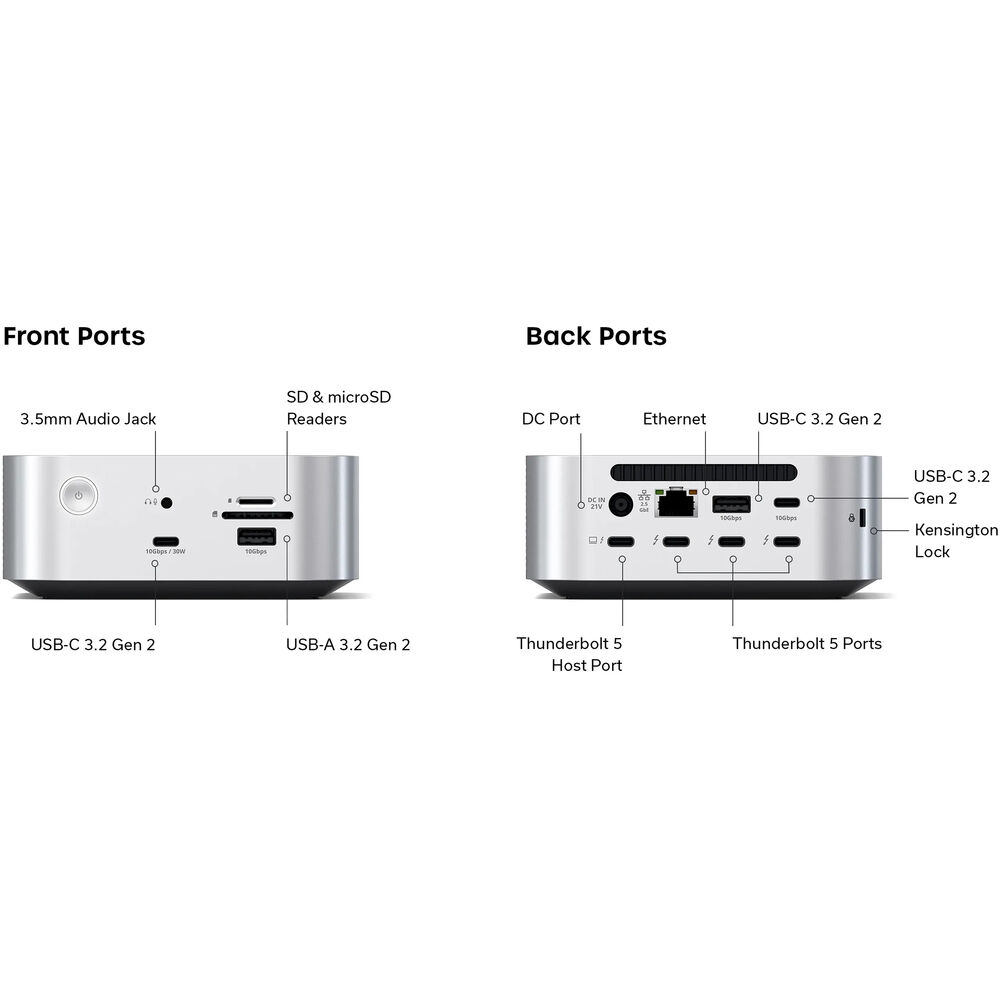
On the front, you get:
- 1 x USB-A 3.2 Gen 2
- 1 x USB-C 3.2 Gen 2 with up to 30W
- full-size SD card reader
- microSD card reader
- 3.5mm headphone/mic combo jack
- power button
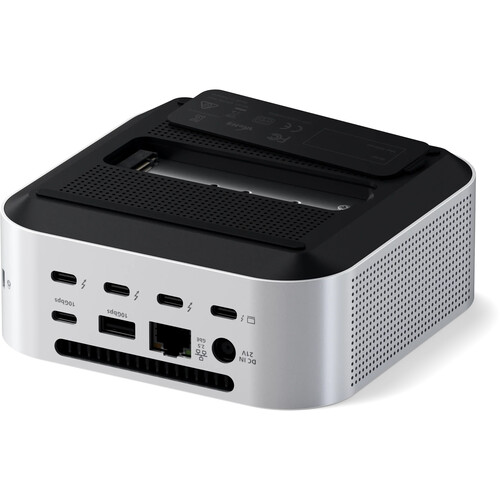
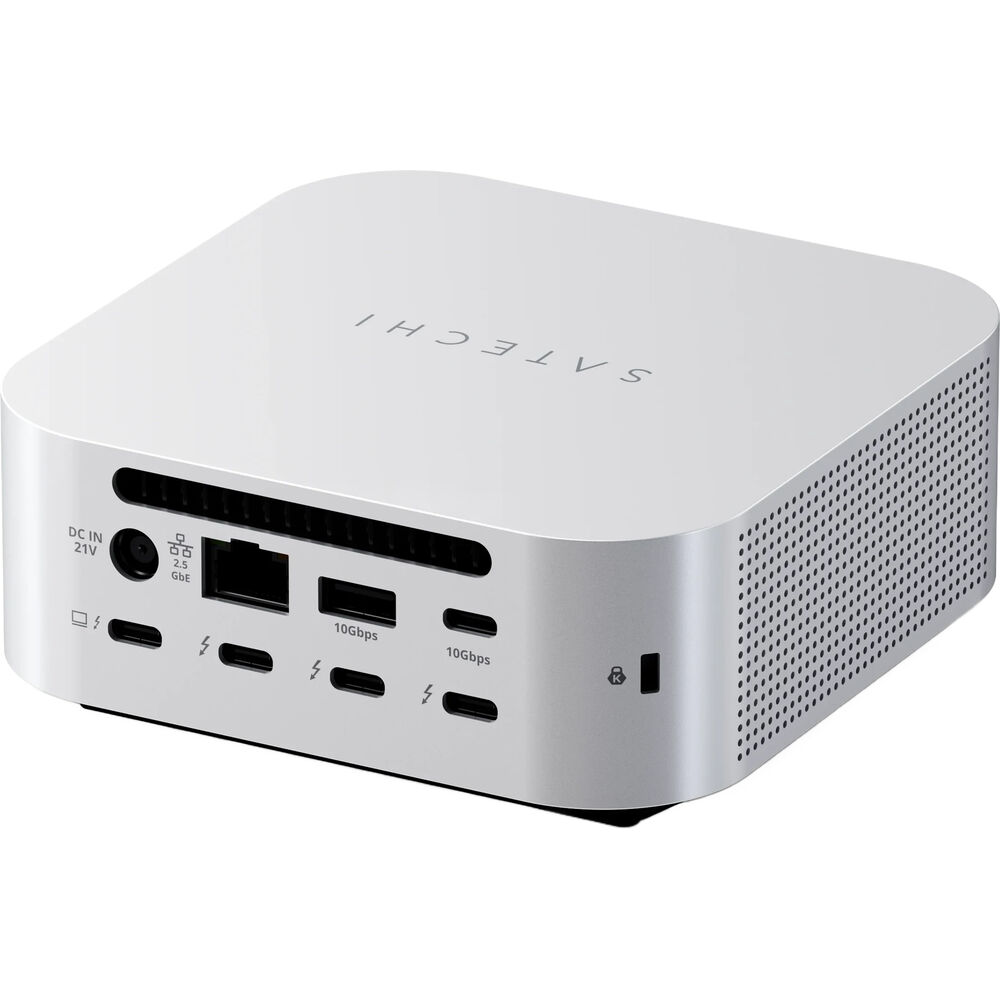
On the back, you get:
- 1 x Thunderbolt 5 host port
- 3 x Thunderbolt 5 downstream ports
- 1 x USB-A 3.2 Gen 2
- 1 x USB-C 3.2 Gen 2
- 2.5Gb Ethernet
- DC power input
That split works. The things we wanted to reach regularly stayed on the front, while the more permanent cable runs stayed hidden on the back.
In daily use, we had the two USB-A ports handling the wireless dongles for the keyboard and trackball mouse, and that worked without issue. The front card readers were especially useful because they were always within reach instead of buried somewhere behind the display. That may sound basic, but accessibility is a big part of what makes a dock feel helpful rather than merely capable.
The only layout point we were less convinced by was the fact that the two USB-A ports are split between the front and rear rather than grouped together. It did not create a real problem for us, but we can see why some buyers would prefer both legacy USB ports in one place. It is not a flaw so much as a preference issue.

The SSD enclosure is what makes this dock more than just another dock
This is the feature that changes the entire value proposition.
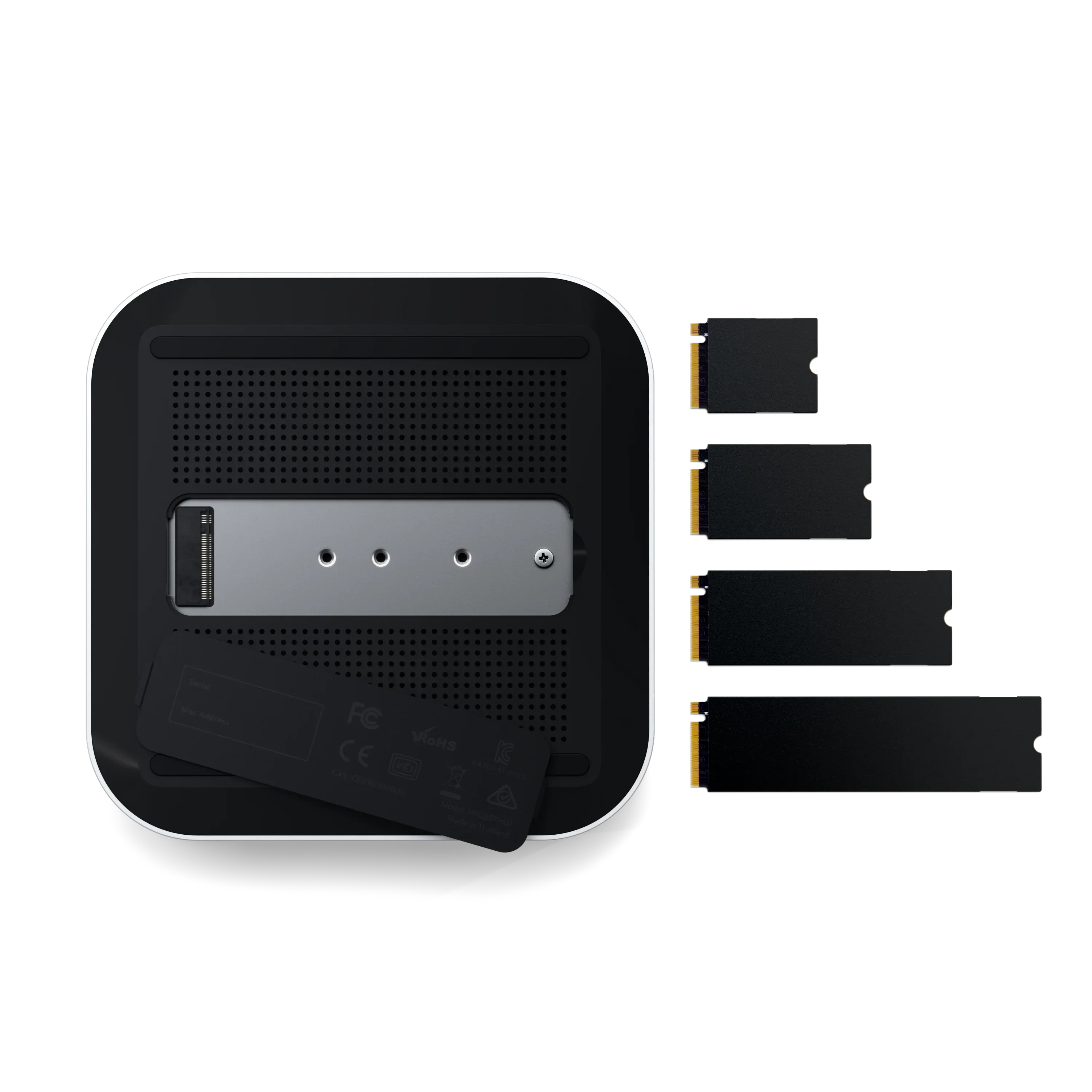
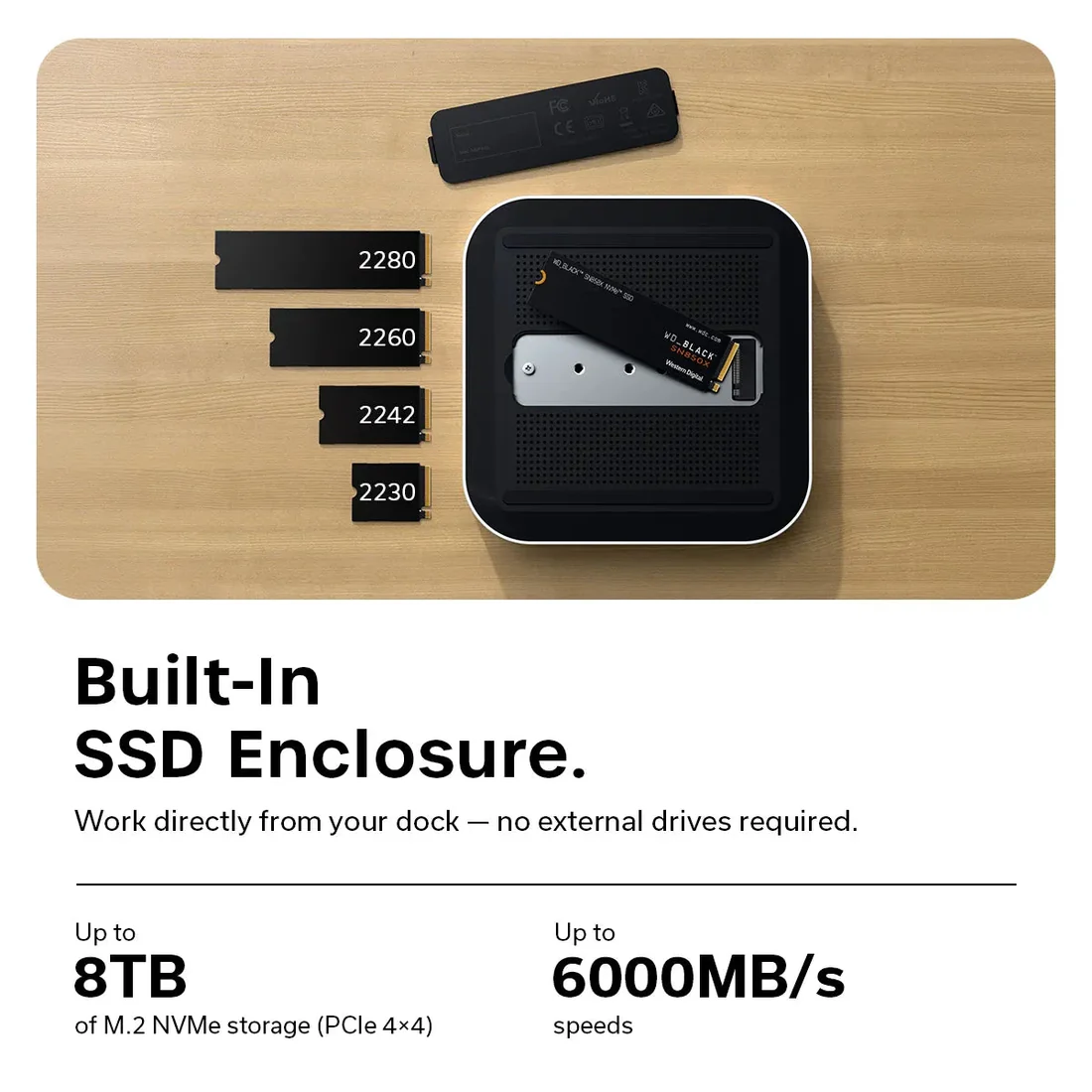
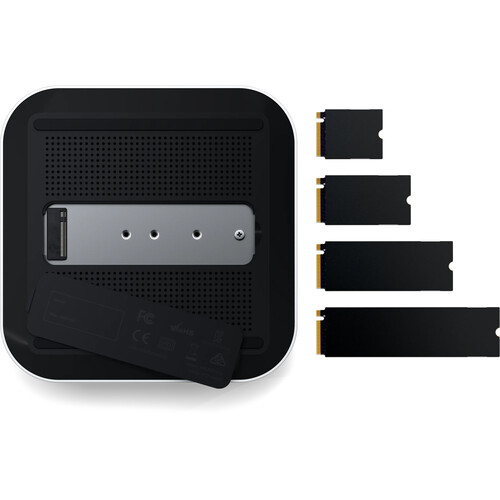
The CubeDock includes a built-in M.2 NVMe SSD enclosure on the underside, with support for 2230, 2242, 2260, and 2280 drives up to 8TB. Satechi quotes speeds up to 6000MB/s, and while the actual result will always depend on the drive you install, the bigger point is that this turns the CubeDock into more than a connectivity accessory.
Instead of buying a separate SSD enclosure, finding space for it, managing another cable, and adding another little device to your desk, you can fold storage directly into the dock. That is smart. Really smart.
Installing the SSD is simple enough. The underside access is clean, and Satechi includes a thermal pad below the drive as well as another larger pad for above it. That second pad is a nice touch because it shows the company understands that this is not decorative storage. This is meant to be functional high-speed workspace storage.
We liked this feature because it made the dock feel like a more complete desk hub. For photo, video, and large project workflows, the ability to dock, charge, connect displays, read cards, and access fast local storage from one compact unit makes a real difference. This is where the CubeDock stops competing with ordinary docks and starts competing as a cleaner all-in-one desktop solution.
The catch, of course, is that the SSD is not included. So the real cost is higher if you want to use the CubeDock to its full potential. Still, even with that in mind, this is the strongest feature on the product.
Real-world performance at the desk
Once the CubeDock was in place, it behaved the way we wanted a high-end dock to behave: it got out of the way.
The primary monitor connection was stable and clear. We had no trouble using it with the Studio Display XDR, and later in the week we added a portable secondary display through one of the rear Thunderbolt 5 ports while powering that screen from the front USB-C port. That setup worked exactly the way it should. No drama, no flaky behavior, no feeling that we were stretching the dock past what it wanted to do.
What stood out to us here was not some dramatic benchmark story. It was consistency. We connected the laptop, the display came to life, the peripherals stayed happy, and the desk felt like a desktop environment built around a laptop instead of a pile of adapters pretending to be one.
That is the whole point of a premium dock. It should reduce friction, not just add capability.
Display support: powerful, but not magically universal
This is the area where buyers need to be realistic.
The CubeDock is a Thunderbolt 5 dock, and on paper the display support sounds huge. On Windows, it can push much further than most buyers will ever need, including high-resolution and high-refresh configurations that make sense for powerful workstation or creator setups. On Mac, though, the experience is still shaped by Apple’s own display limits.
In our use, the main thing we noticed was that the Studio Display XDR connection was capped at 60Hz. That is an important detail. The dock has the bandwidth, but macOS still plays by its own rules, and those rules matter. If you are a Mac user expecting the CubeDock to unlock some miracle display setup on its own, that is not how this works.
That does not make the dock weak. It just means the host machine still determines a lot of the real-world display story.
If you are on the right hardware, the CubeDock makes sense. If you are on older or more limited Apple hardware and shopping based only on the phrase “Thunderbolt 5,” you may be paying for capability you cannot fully use yet.
The lack of native HDMI and DisplayPort outputs is the other thing to note. Everything display-related flows through Thunderbolt or USB-C paths here. That is a clean, modern choice, but it is not the most convenient option for every desk. If your setup already revolves around USB-C displays, it feels natural. If it does not, adapters may become part of the equation.
Daily convenience and desk usability
This is where the CubeDock earned most of our affection.
We genuinely liked having the front ports within easy reach. The card readers were easy to use, the front USB-C port came in handy, and the dock’s footprint never felt intrusive. It sat there like it belonged.
That matters because convenience is not just about how many ports a dock has. It is about how easy those ports are to use once the dock becomes part of a routine. On that front, the CubeDock does very well.
The power button is another example. On paper it is just a button. In daily use, it becomes a little ritual: sit down, power on the dock, wake the workstation. Done for the day, power it down. It sounds almost silly to praise something that simple, but so many docks feel indifferent to human use. This one does not.
We also liked that the dock did not demand awkward desk compromises. It is compact enough to live near the monitor, attractive enough to leave in the open, and functional enough that keeping it visible actually improves the experience.
Heat, thermals, and long sessions
With this much bandwidth, this much charging potential, and an internal SSD bay, heat is part of the story whether a brand wants to admit it or not.
The good news is that the CubeDock handled itself sensibly during long sessions. We did notice that the top of the unit got warm to the touch after extended use, but it never felt worryingly hot in the context of what the dock is doing. More importantly, the front area where we were actually reaching for ports stayed more comfortable.
That turned out to matter. If a dock gets hot exactly where your hands need to go, you notice it quickly. That was not the case here.
Satechi has clearly thought about cooling, and that shows in the product design. Between the vented chassis, the aluminum body, and the fact that the dock did not feel like it was suffocating under everyday workload, we came away feeling that the thermal side of the design was taken seriously.
Flaws and frustrations
The biggest weakness is price.
At $399.99, this is expensive enough that every compromise feels bigger. If this were a much cheaper dock, we would shrug off a few limitations and move on. At this level, the missing things matter more.
The first is the lack of built-in HDMI or DisplayPort. For some buyers, that will be irrelevant. For others, it will be the main reason they skip it. A dock this premium invites scrutiny, and native display outputs still matter in the real world.
The second is the external power brick. We understand why it exists. A dock pushing 140W host charging plus additional power to other devices is not going to run on a tiny adapter. Still, it slightly undermines the elegance of the product. The box on the desk is beautiful. The box under the desk is not.
The third is value relative to pure port count. The CubeDock is not trying to be the most port-dense dock on the market, and we understand that. It is going for a cleaner, more premium, more consolidated vision. But if you are the kind of buyer who counts ports first and aesthetics second, you may feel underwhelmed for the money.
Finally, Mac display behavior remains a point of caution. This is not a dock flaw in isolation, but it affects the ownership experience enough that it has to be part of the buying advice.
Value for money
This is where the CubeDock becomes a very specific recommendation.
If you view it as just a dock, it is expensive. Very expensive.
If you view it as a Thunderbolt 5 dock + premium aluminum desk hub + built-in NVMe enclosure + high-wattage charging station, the price starts to make more sense. That does not make it cheap, but it does make it easier to justify.
We think the smartest way to judge this product is to ask one question: would you otherwise buy a premium dock and a separate fast SSD enclosure anyway? If the answer is yes, the CubeDock becomes much more attractive. If the answer is no, the number on the box gets harder to defend.
This is not the value pick. It is the cleaner, nicer, smarter premium pick.
Pros and cons
Pros
- Excellent all-aluminum design that genuinely looks good on a desk
- Thunderbolt 5 connectivity with strong charging support
- Built-in M.2 NVMe SSD enclosure is a genuinely useful differentiator
- Front-facing card readers and ports are easy to live with
- 2.5Gb Ethernet is a strong inclusion
- Compact footprint for the amount of capability inside
- Power button is simple, visible, and actually useful
Cons
- $399.99 price will be hard to justify for many buyers
- No built-in HDMI or DisplayPort
- Large external 180W power brick
- Mac users still run into platform-level display limits
- Not the most ports per dollar if that is your priority
Who should buy it
Buy this if you use a premium laptop as the center of a serious desk setup and want the dock to feel like part of that setup instead of an ugly technical necessity.
It makes the most sense for:
- MacBook Pro users with demanding desk workflows
- Windows laptop users who can really benefit from Thunderbolt 5
- creators working with camera media and large files
- buyers who want fast local storage built directly into the dock
- people who care about the look of their workspace as much as the port list
If your laptop spends a lot of time docked, and your desk already feels like a semi-permanent workstation, the CubeDock fits that life very well.
Who should skip it
Skip it if your needs are simple.
You probably do not need this if:
- you just want more ports for casual use
- you need built-in HDMI or DisplayPort
- your laptop cannot really exploit Thunderbolt 5
- you do not care about the built-in SSD enclosure
- value matters more to you than design and consolidation
There are cheaper ways to solve a basic docking problem. The CubeDock is for the buyer who wants a premium solution, not the cheapest functional one.
Final verdict
The Satechi Thunderbolt 5 CubeDock with SSD Enclosure gets something right that a lot of docks still miss: it understands that a modern desk accessory has to be pleasant to use, easy to reach, visually clean, and genuinely helpful every day. It is not enough to throw a pile of ports onto a box and call it premium. The CubeDock feels like it was designed to live on the desk, not under it, and that alone gives it a different kind of appeal.
What we appreciated most was how complete it felt. The built-in SSD enclosure is not a gimmick. The front ports are not an afterthought. The high-wattage charging is not there just to pad a spec list. It all comes together in a way that makes sense for a serious laptop-based workspace.
It is still an expensive product, and we would not pretend otherwise. The missing display outputs, the big power brick, and the platform caveats for Mac users keep this from being a universal recommendation. But for the buyer it is clearly aimed at, this is one of the most compelling premium docks we have seen.
Our take is straightforward: if you need a high-end dock and you like the idea of folding fast storage directly into the same compact unit, the CubeDock is easy to like and hard to forget.
FAQ
Is the Satechi Thunderbolt 5 CubeDock worth it?
Yes, for the right setup. If you want Thunderbolt 5, 140W host charging, reachable front ports, 2.5Gb Ethernet, and a built-in NVMe SSD enclosure, it feels like a premium product with a clear purpose. If you only need extra ports, it is harder to justify.
Does it come with an SSD installed?
No. The SSD bay is built in, but you need to install your own M.2 NVMe drive.
What SSD sizes does it support?
It supports 2230, 2242, 2260, and 2280 M.2 NVMe drives, with support up to 8TB.
Does it have HDMI or DisplayPort?
No. Video output runs through the Thunderbolt 5 ports, so some setups may need adapters.
How much charging power does it offer?
It can provide up to 140W to the host device through the upstream Thunderbolt 5 connection, and the front USB-C port can deliver up to 30W.
Is it good for Mac users?
Yes, especially for newer MacBook Pro and Apple Silicon setups that can take advantage of the bandwidth and charging. Just be aware that macOS still controls a lot of the display behavior.
Does it get hot?
It gets warm on top during longer sessions, but in our use it stayed well within what we would expect from a dock doing this much at once.
What is the best reason to buy it instead of another dock?
The built-in NVMe SSD enclosure. That one feature gives the CubeDock a much stronger identity than most premium docks and makes it feel like a true desk hub instead of just a connectivity add-on.
Explore the Full Gallery
Every image from this article, gathered in one clean place. Tap any photo to open it larger.